
By KAVANI | Fact-checked: August 30, 2026
Direct answer: Samsung Smart TVs run Tizen OS, a closed platform that only installs apps through the Samsung Smart Hub — there’s no APK sideloading like on Android devices. In France, officially supported apps include Molotov, Samsung TV Plus, and myCanal; some third-party IPTV players require workarounds that Samsung doesn’t officially support and that carry real security trade-offs.
Table of Contents
How Samsung Smart TVs Handle Apps: Tizen vs. Android
If you’ve used an Android-based streaming device before, Samsung’s Smart TV platform works differently. Samsung Smart TVs run Tizen OS, a Linux-based operating system Samsung has used since around 2015, and it is not Android. That distinction matters for IPTV specifically: Tizen doesn’t support installing APK files the way Android TV or Fire TV devices do. Apps come exclusively through the Samsung Smart Hub, Samsung’s own curated app store, unless you deliberately enable a developer mode intended for app testing, not everyday use.
This means that if an IPTV app or streaming service isn’t listed in your Smart Hub, there is no equivalent of “downloading the APK” to get around that — at least not without stepping outside Samsung’s intended use case, which introduces the risks covered further down.
Official IPTV and Streaming Apps for Samsung TV in France
Molotov
Molotov’s own help documentation confirms the app is available on Samsung Smart TVs running Tizen OS, specifically models from around 2018 onward. To install it, you search “Molotov TV” directly in the Samsung Smart Hub’s Apps store, install it, and sign in with your Molotov account credentials. Molotov also requires your TV to be connected to the French Samsung Store and set to “France” in your region settings for the app to appear and function correctly.
Samsung TV Plus
Samsung TV Plus is Samsung’s own free, ad-supported channel service, available exclusively on Samsung Smart TVs and Galaxy devices — no subscription or account required. Samsung’s French site describes it as offering live and on-demand entertainment, news, and sports channels at no cost. Since 2023, Samsung TV Plus in France has added Altice-owned channels including BFM TV, BFM Business, RMC Story, RMC Découverte, and Tech & Co.
myCanal
Canal+’s official app, myCanal, is also available through Samsung’s app store on compatible Smart TVs, giving Canal+ subscribers access to their subscription content directly on the TV without a separate streaming box. As with any subscription-based app, full access requires an active Canal+ subscription.
Why Some IPTV Apps Aren’t in the Samsung Smart Hub
The SS IPTV Availability Conflict
If you’ve searched for “SS IPTV” (Simple Smart IPTV, a general-purpose playlist player popular for loading M3U lists), you may have run into conflicting information. The app’s own official website states plainly that SS IPTV is not available in the Samsung Smart TV app store and must instead be run from a USB stick inserted into the TV. Other independent guides claim the opposite — that SS IPTV can be searched and installed directly from the Samsung Smart Hub. VibeCastTV could not resolve this conflict from publicly available sources at the time of writing, and readers should check the app’s own official site directly before assuming either method will work on their specific TV model and region.
Developer Mode: What It Does and Its Risks
Some tutorials recommend enabling Tizen’s developer mode to install apps outside the Smart Hub, or using third-party app-store services that promise to “sideload any application” onto a Samsung TV. Developer mode exists for app testing, not for installing consumer IPTV players, and it changes your TV’s security posture by opening an administrative access path that’s normally hidden from regular users.
This isn’t a theoretical concern. In August 2026, cybersecurity firm Bishop Fox disclosed a command-injection vulnerability (tracked as SVE-2025-50109) affecting Samsung Tizen OS through version 9.0, which could allow OS-level code execution on the TV. Exploitation requires developer mode to be enabled and access from the TV’s configured developer-mode host IP, meaning the practical risk is limited to situations where developer mode is left on and the network isn’t tightly controlled — but it’s a documented example of why Samsung’s normal app restrictions exist in the first place. Bishop Fox’s own guidance recommends disabling developer mode when it isn’t actively needed.
Setting Up a Legal IPTV or Streaming App on Samsung TV
- Confirm your TV is connected to the internet and set to the correct region (France) in Settings.
- From the home screen, open the Apps icon in the Smart Hub.
- Use the search icon and type the exact name of the app you want (for example, “Molotov” or “myCanal”).
- Select the official app from the search results and choose Install.
- Once installed, open the app and sign in using the account or subscription credentials provided by that specific service.
Enter only account information or playlist details supplied by a provider you are authorized to use. VibeCastTV does not provide playlists, server access, portal URLs, or television credentials.
How to Verify Any IPTV Provider Before Entering Credentials
Before entering any username, password, M3U playlist URL, or Xtream Codes details into an app on your Samsung TV, check the same basics that apply on any device:
- Is the app listed directly in the Samsung Smart Hub, or does installing it require developer mode or a third-party app store?
- Does the provider behind the app have a verifiable company name and support contact?
- Is the pricing realistic for the content on offer, or does it promise extensive premium channels for an implausibly low price?
- Does the provider avoid pressuring you to keep developer mode permanently enabled?
The provider’s content-licensing arrangements could not be independently verified from publicly available information for any app not distributed through Samsung’s official store or a named broadcaster’s own channel.
VibeCastTV : Best IPTV on Samsung Smart TV in France 2026
VibeCastTV is an IPTV subscription service designed for users who want to stream live television and on-demand entertainment across multiple devices. The platform focuses on providing an easy setup experience, flexible subscription plans, and compatibility with many popular IPTV applications.
Whether you’re looking for news, entertainment, sports programming, or international channels, VibeCastTV aims to offer a convenient streaming solution for users in the USA, Canada, and other supported regions.
Key Features
📺 Live Television
VibeCastTV provides access to a wide range of live television categories, including entertainment, news, lifestyle, children’s programming, and international content.
🎬 Video on Demand
Subscribers can browse a library of on-demand content, with new titles added periodically depending on availability.
🖥️ Multi-Device Compatibility
The service is compatible with many popular IPTV devices and applications, including:
- Amazon Fire TV & Fire Stick
- Android TV
- Android smartphones and tablets
- iPhone & iPad
- Windows PCs
- Mac computers
- Smart TVs
- IPTV Smarters
- TiviMate
- XCIPTV
- Other apps that support M3U playlists or Xtream Codes API
📡 Streaming Quality
Where supported by the source and internet connection, streams may be available in:
- HD
- Full HD (1080p)
- 4K Ultra HD
Actual quality may vary depending on content availability, device capabilities, and network performance.
⚡ Quick Setup
New customers receive setup information after subscribing, making it possible to start using the service in a short amount of time.
💬 Customer Support
VibeCastTV provides customer assistance for account setup, installation, and general service questions.
Services
Depending on the subscription plan, VibeCastTV may include access to:
- Live TV
- Entertainment channels
- News channels
- Sports programming
- Kids’ content
- International channels
- Video-on-Demand (VOD)
- Electronic Program Guide (where supported)
- Multi-device compatibility
- Setup assistance
Available content may vary over time.
Pricing
VibeCastTV offers several subscription lengths, allowing users to choose the option that best fits their needs.
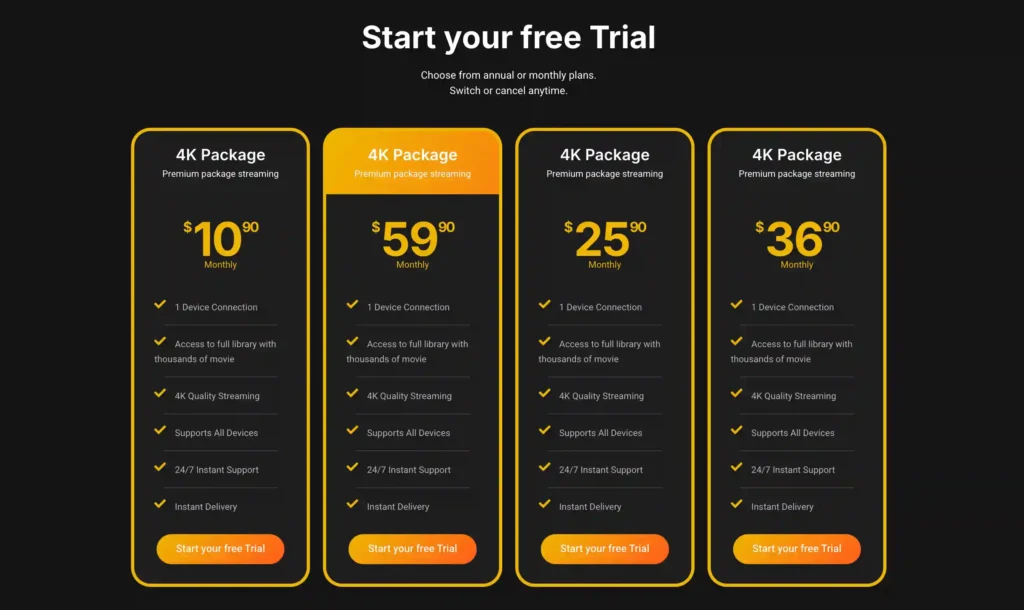
A free trial is available for eligible new users. Subscription prices and promotions can change, so it’s recommended to check the official official VibeCastTV website.
Troubleshooting Common Samsung TV Streaming Issues
| Issue | Likely cause category | What to check first |
|---|---|---|
| App won’t appear in Smart Hub search | Regional/account issue | Confirm your TV’s region is set to France and your Samsung account matches |
| App installs but won’t open | Device/application issue | Restart the TV, check for a pending Tizen software update |
| Login fails in Molotov or myCanal | Account issue | Confirm your subscription is active and credentials are correct on the provider’s own site |
| Buffering during playback | Home-network issue | Check Wi-Fi signal strength or switch to an Ethernet connection if available |
| Developer mode won’t stay enabled | Device issue | This is often intentional; Samsung does not design developer mode for permanent everyday use |
Limitations of This Guide
App availability on Samsung’s Smart Hub varies by TV model, manufacturing year, and region settings, and can change without notice. This article is based on official documentation, publicly available policies, and independent editorial research rather than hands-on testing on a specific Samsung TV model.
FAQs
Can I install any IPTV app on my Samsung Smart TV?
Only apps listed in the Samsung Smart Hub install through Samsung’s normal process. Apps outside that store require developer mode or third-party app-store workarounds, which Samsung doesn’t design for everyday consumer use.
Is Samsung TV Plus really free in France?
Yes, Samsung TV Plus is an ad-supported service offered at no cost exclusively on Samsung Smart TVs and Galaxy devices, according to Samsung’s own French site.
Is enabling developer mode on my Samsung TV dangerous?
It changes your TV’s security posture by opening an administrative access path. A 2026 security disclosure by Bishop Fox found a vulnerability in Tizen OS that specifically requires developer mode to be enabled to exploit, which is why security researchers recommend disabling it when not actively needed.
Is SS IPTV available directly on my Samsung TV?
Sources conflict on this. SS IPTV’s own site states the app isn’t in Samsung’s Smart Hub and must run from a USB stick, while some independent guides claim otherwise. Check the app’s official site for the current, model-specific answer before relying on either claim.
Does Molotov work on every Samsung Smart TV?
Molotov is available on Samsung TVs running Tizen OS from roughly 2018 onward, according to Molotov’s own help center — older models or non-Tizen Samsung TVs may not support it.
Do I need a VPN to use IPTV apps on my Samsung TV in France?
No. A VPN does not make unauthorized streaming legal and may violate a streaming platform’s terms when used to bypass geographic restrictions. Legitimate apps like Molotov and myCanal don’t require a VPN to function.
Conclusion
Getting IPTV working on a Samsung Smart TV in France doesn’t require developer mode, third-party app stores, or unverified playlist sources — Molotov, Samsung TV Plus, and myCanal cover a broad range of French TV needs directly through the official Smart Hub. Where a specific app isn’t officially listed, that’s usually a deliberate Tizen restriction rather than an oversight, and it’s worth weighing the documented security trade-offs before working around it.
Copyright and lawful-use notice: This article is intended for general education and lawful troubleshooting. VibeCastTV does not sell IPTV subscriptions, host television channels, provide streaming credentials, distribute playlists, or encourage copyright infringement. Readers should use only services and content they are authorized to access. Provider licensing, platform availability, and streaming rights vary by country and may change over time.







