
By KAVANI | Fact-checked: July 22, 2026
Quick Answer
The best IPTV player depends primarily on your device. TiviMate is the strongest documented option for a customizable Android TV interface, while Sparkle TV emphasizes DVR and PVR functions. IPTVX and UHF are designed for Apple devices. Kodi offers the most flexibility for advanced users, and VLC is a practical free fallback for testing basic streams.
An IPTV player does not automatically include television channels, movies, subscriptions, or streaming rights. You must use account information, media, or playlist details that you are authorized to access.
Table of Contents
IPTV Player Comparison at a Glance
| IPTV player | Primary platforms | Documented strengths | Important limitation | Recommended for |
| TiviMate | Android TV | EPG, multiple playlists, recording, catch-up, multiview, remote-focused interface | Not optimized for phones or tablets | Android TV power users |
| Sparkle TV | Android TV, Google TV, Fire TV | EPG, timeshift, DVR, multiview, home-server and PVR integrations | Several advanced features require Plus | Recording and advanced TV setups |
| Televizo | Android | Multiple playlists, EPG, catch-up, Chromecast, parental controls | Less focused on a full living-room DVR experience | Android phones and straightforward use |
| IPTVX | Apple TV, iPhone, iPad | Apple-focused interface, EPG, AirPlay, picture-in-picture, multiple playlists | Many features are tied to in-app purchases | Apple TV users prioritizing presentation |
| UHF | Apple TV, iPhone, iPad | Global search, playlist management, EPG, Apple-device support | Newer Apple operating systems are required | Apple households seeking flexibility |
| Smarters Player Lite | Apple TV, iPhone, iPad | Simple playlist playback, M3U support, EPG | Similar app names make seller verification important | Beginners who want a familiar interface |
| Kodi | Windows, macOS, Linux, Android, iOS, tvOS, Raspberry Pi | Open source, highly configurable, IPTV Simple Client, EPG | Setup is more technical | Advanced users and media-center installations |
| VLC | Windows, macOS, Linux, Android, iOS | Free, open source, broad codec and network-stream support | No television-style EPG or DVR workflow | Stream testing and basic playback |
The recommendations above are based on current official documentation and app-store information, not VibeCastTV hands-on testing.
What Is an IPTV Player?
An IPTV player is an application that plays internet-delivered television or video streams supplied by another source. Depending on the application, it may accept an M3U playlist, an M3U8 address, an XMLTV guide, an Xtream-compatible account, a local media server, or another supported format.
The player organizes and displays the available content. It does not establish whether the content source is authorized, reliable, or licensed.
A paid upgrade to a player normally unlocks application functions. It should not be interpreted as payment for channels or a television subscription. TiviMate’s official listing, for example, expressly states that its premium upgrade covers application features and does not provide streams or media.
How We Evaluated These IPTV Players
This comparison is based on official developer documentation, app-store listings, published privacy information, and current platform compatibility. It does not claim first-hand performance testing.
Platform compatibility
A strong player is useless when it does not run on the reader’s device. Android TV applications, touch-oriented Android applications, Apple TV applications, and desktop media centers serve different use cases.
Television-interface features
For living-room use, useful documented features include:
- Remote-friendly navigation
- Grid-style EPG
- Favorites
- Search
- Multiple playlists
- Catch-up
- Timeshift
- Recording
- Parental controls
- Multiview
Playlist and account support
Not every application accepts the same input. Readers should check whether their authorized service supplies:
- M3U or M3U8
- XMLTV EPG
- Xtream-compatible account details
- Stalker Portal access
- Jellyfin, Plex, or another media-server connection
Privacy and installation safety
The safest starting point is the official operating-system store or the developer’s verified website. Google says Play Protect checks applications for harmful behavior and can warn, disable, or remove potentially harmful software. Apple says App Store submissions are reviewed against privacy, security, and safety standards.
Store review is not a guarantee that every application is suitable for every user. Read the privacy label, verify the developer name, inspect subscription terms, and avoid applications that imitate a better-known product.
Cost transparency
A free download may include advertisements, playback limits, restricted playlists, or locked advanced features. Prices and renewal terms can vary by country and change without notice, so confirm them inside the official store immediately before purchase.
Best IPTV Service For IPTV Players 2026 (Tested & Verified)
VibeCastTV Review (2026): IPTV Service forIPTV Players & Streaming Entertainment
VibeCastTV is an IPTV subscription service designed for users who want to stream live television and on-demand entertainment across multiple devices. The platform focuses on providing an easy setup experience, flexible subscription plans, and compatibility with many popular IPTV applications.
Whether you’re looking for news, entertainment, sports programming, or international channels, VibeCastTV aims to offer a convenient streaming solution for users in the USA, Canada, and other supported regions.
Key Features
📺 Live Television
VibeCastTV provides access to a wide range of live television categories, including entertainment, news, lifestyle, children’s programming, and international content.
🎬 Video on Demand
Subscribers can browse a library of on-demand content, with new titles added periodically depending on availability.
🖥️ Multi-Device Compatibility
The service is compatible with many popular IPTV devices and applications, including:
- Amazon Fire TV & Fire Stick
- Android TV
- Android smartphones and tablets
- iPhone & iPad
- Windows PCs
- Mac computers
- Smart TVs
- IPTV Smarters
- TiviMate
- XCIPTV
- Other apps that support M3U playlists or Xtream Codes API
📡 Streaming Quality
Where supported by the source and internet connection, streams may be available in:
- HD
- Full HD (1080p)
- 4K Ultra HD
Actual quality may vary depending on content availability, device capabilities, and network performance.
⚡ Quick Setup
New customers receive setup information after subscribing, making it possible to start using the service in a short amount of time.
💬 Customer Support
VibeCastTV provides customer assistance for account setup, installation, and general service questions.
Services
Depending on the subscription plan, VibeCastTV may include access to:
- Live TV
- Entertainment channels
- News channels
- Sports programming
- Kids’ content
- International channels
- Video-on-Demand (VOD)
- Electronic Program Guide (where supported)
- Multi-device compatibility
- Setup assistance
Available content may vary over time.
Pricing
VibeCastTV offers several subscription lengths, allowing users to choose the option that best fits their needs.
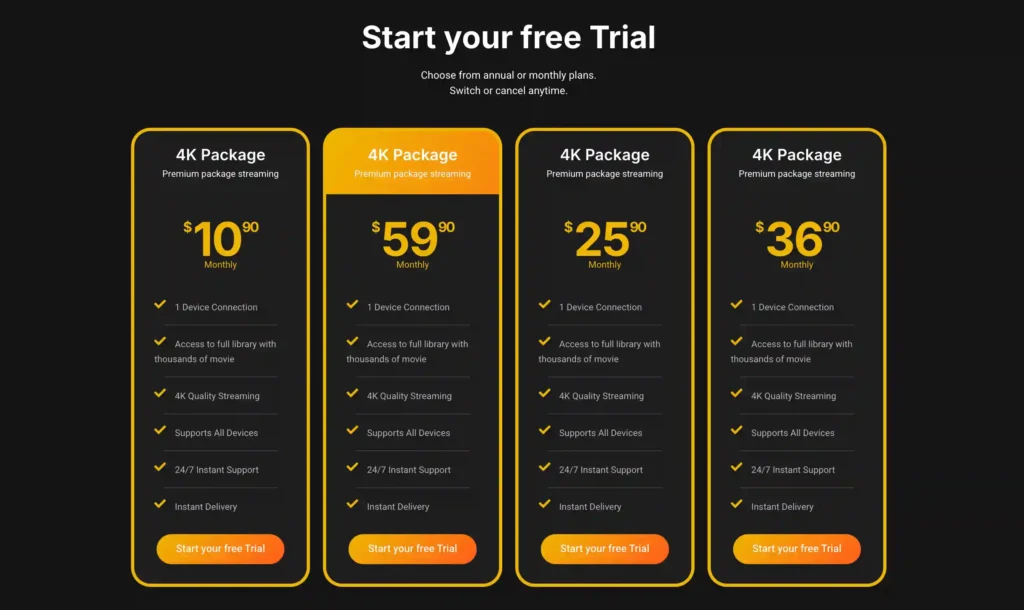
A free trial is available for eligible new users. Subscription prices and promotions can change, so it’s recommended to check the official VibeCastT
Best IPTV Players by Use Case
1. TiviMate: Best for Android TV Customization
TiviMate is built for Android TV and navigation with a television remote. Its official listing documents support for M3U, Xtream Codes, and Stalker Portal formats, along with a grid EPG, multiple playlists, favorites, catch-up, recording, search, parental controls, and multiview.
TiviMate is a good fit when:
- Your primary device runs Android TV
- You want a traditional television-style guide
- You need several playlists
- You want detailed interface customization
- Recording or multiview is important
TiviMate limitations
TiviMate is not optimized for touch-based phones or tablets. It is also not the appropriate recommendation for Apple TV, iPhone, Windows, Samsung Tizen, or LG webOS users.
Some of its more useful features may require a paid upgrade. Check the current price and device allowance in the official application before purchasing.
Editorial verdict
Choose TiviMate when Android TV is your main platform and you value a polished, remote-focused television interface more than cross-platform availability.
2. Sparkle TV: Best for Android TV DVR and PVR Features
Sparkle TV is a television-oriented player for Android TV, Google TV, and Fire TV-style use. Its official listing documents M3U, M3U8, XMLTV, Xtream Codes, Jellyfin, Plex, Tvheadend, Enigma2, HDHomeRun, and other PVR sources.
Documented features include:
- Program guide
- Timeshift
- Scheduled DVR
- Multiview
- Catch-up
- Multiple sources
- Parental controls
- Remote customization
- Automatic frame-rate support
Several advanced functions require the Plus version.
Sparkle TV is a good fit when:
- You use Android TV or Google TV
- You want to combine IPTV with a home media server or tuner
- Recording and timeshift are priorities
- You need more source options than a basic playlist app provides
Sparkle TV limitations
Its breadth can make setup more complicated than a simple playlist player. Most major features are designed for television devices rather than mobile use.
Editorial verdict
Choose Sparkle TV for an Android-based living-room setup where DVR, timeshift, or integration with home television sources matters more than simplicity.
3. Televizo: Best for Straightforward Android Use
Televizo is an Android IPTV player with documented support for multiple playlists, EPG data, catch-up, Chromecast, favorites, parental controls, sorting, search, and selectable video, audio, and subtitle tracks. The Google Play listing was updated on June 13, 2026.
Televizo is a good fit when:
- You mainly watch on an Android phone or tablet
- You want simple playlist management
- Chromecast support is useful
- You need an EPG without a complex media-center setup
Televizo limitations
It is less oriented toward full home-theater DVR management than TiviMate or Sparkle TV. Some features and advertising conditions may depend on the free or paid version.
Editorial verdict
Choose Televizo when you want a direct Android playlist player without the complexity of a full PVR platform.
4. IPTVX: Best Polished Option for Apple TV
IPTVX is available for iPhone, iPad, and Apple TV. Its official US App Store listing documents Xtream API, M3U, M3U8, Plex, SMB, EPG, catch-up, picture-in-picture, AirPlay 2, multiple playlists, parental controls, subtitles, and audio-track selection.
The listing also describes iCloud synchronization and support for Dolby Vision, HDR10, and HLG. These are developer-supplied feature claims and should not be interpreted as a guarantee that every stream, television, or provider will deliver those formats.
IPTVX is a good fit when:
- Apple TV is your primary streaming device
- You also use an iPhone or iPad
- Interface design and Apple ecosystem integration are priorities
- You want EPG search and playlist synchronization
IPTVX limitations
The free version may not expose every useful feature. Subscription and family-sharing prices vary by store and region.
Playback quality still depends on the original stream, codec, device, network, and provider infrastructure.
Editorial verdict
Choose IPTVX when you want an Apple-focused interface and are comfortable reviewing its in-app purchase options.
5. UHF: Best Flexible Apple Ecosystem Option
UHF is available for iPhone, iPad, and Apple TV. Its current US listing documents M3U8, Xtream, Jellyfin, global search, EPG functions, and playlist-management features. The listing also states that UHF is a player only and warns that services claiming to be official UHF partners may be scams.
UHF is a good fit when:
- You use several Apple devices
- You want centralized search across playlists
- You use a Jellyfin-based media collection
- You want an alternative to IPTVX
UHF limitations
The current listing requires relatively recent Apple operating systems, including tvOS 17 or later for Apple TV. Some advanced options require an in-app purchase.
Editorial verdict
Choose UHF when you want flexible Apple-device support and broader media-library integration.
6. Smarters Player Lite: Best Simple Apple TV Starting Point
The official WHMCS SMARTERS version of Smarters Player Lite is listed for iPhone, iPad, and Apple TV. Its App Store page documents M3U and JSON playlist support and an integrated EPG. It does not supply television channels or subscriptions.
Smarters Player Lite is a good fit when:
- You want a recognizable, straightforward interface
- Your authorized source supplies a supported playlist
- You need basic Apple TV and mobile compatibility
- You do not require advanced DVR functions
Smarters Player Lite limitations
Numerous applications use words such as “Smarters,” “IPTV Smarters,” or “Player Lite.” Some are produced by unrelated developers. Confirm the seller name, application identifier, privacy label, and subscription terms before installing.
The official App Store privacy disclosure indicates that usage data may be used for tracking or advertising purposes. Readers who prioritize minimal tracking should compare that disclosure with alternatives before choosing the application.
Editorial verdict
Choose Smarters Player Lite for uncomplicated playlist playback, but take extra care to identify the intended application and review its privacy information.
7. Kodi: Best Open-Source Media-Center Option
Kodi is a free, open-source media center available for Windows, Linux, Android, Raspberry Pi, macOS, iOS, and tvOS. The official Kodi download page states that Kodi itself does not contain media content.
Kodi’s official IPTV Simple Client supports M3U playlists, live television, radio, and EPG information. It is installed through Kodi’s PVR client repository.
Kodi is a good fit when:
- You want an open-source media center
- You manage local and network media as well as live streams
- You are comfortable configuring add-ons
- You need a desktop, Raspberry Pi, or custom home-theater setup
Kodi limitations
Kodi requires more configuration than a dedicated IPTV application. Add-on quality and legality vary, and Kodi’s availability does not make every third-party add-on lawful or trustworthy.
Use the official Kodi repository wherever possible. Avoid “fully loaded” builds, piracy add-ons, and modified packages from unverified sources.
Editorial verdict
Choose Kodi when customization and open-source control are more important than quick setup.
8. VLC: Best Free Fallback Player
VLC is a free, open-source multimedia player for Windows, macOS, Linux, Android, iOS, and other platforms. VideoLAN documents broad codec support, hardware decoding on many platforms, and support for network streams.
VLC is a good fit when:
- You want to test whether a basic stream opens
- You need broad codec support
- You want a free desktop player
- You do not need a television-style interface
VLC limitations
VLC is not a full IPTV management system. It lacks the polished EPG, catch-up organization, multiview, account management, and DVR workflows offered by dedicated television players.
Editorial verdict
Choose VLC as a diagnostic or basic playback tool rather than as the primary interface for a large live-TV collection.
Which IPTV Player Should You Choose?
Choose by device
| Your device | First applications to compare |
| Android TV or Google TV | TiviMate and Sparkle TV |
| Fire TV | Sparkle TV or a verified Android TV-compatible player from the official Amazon store |
| Android phone or tablet | Televizo |
| Apple TV | IPTVX, UHF, and the verified WHMCS SMARTERS version of Smarters Player Lite |
| iPhone or iPad | IPTVX, UHF, or Televizo alternatives available in the official store |
| Windows, macOS, or Linux | Kodi or VLC |
| Raspberry Pi media center | Kodi |
Choose by feature
| Feature needed | Applications to examine |
| Remote-focused EPG | TiviMate |
| DVR and timeshift | Sparkle TV |
| Android mobile simplicity | Televizo |
| Apple interface and synchronization | IPTVX |
| Apple media-library flexibility | UHF |
| Basic familiar playlist interface | Smarters Player Lite |
| Open-source customization | Kodi |
| Codec troubleshooting | VLC |
Choose by technical experience
Beginner: Televizo, Smarters Player Lite, or IPTVX
Intermediate: TiviMate, UHF, or Sparkle TV
Advanced: Kodi or a home-server-integrated Sparkle TV setup
Free vs. Paid IPTV Players
A free player can be enough when you need:
- One playlist
- Basic playback
- Simple favorites
- Limited EPG access
- Occasional mobile viewing
A paid version may be justified when you need:
- Several playlists
- Recording
- Timeshift
- Multiview
- Family sharing
- Cloud synchronization
- Advanced guide management
- Removal of advertisements
Before purchasing, confirm:
- Whether the price is recurring or one-time.
- How many devices are covered.
- Whether family sharing is supported.
- Whether cancellation is managed through Apple, Google, Amazon, or the developer.
- Whether a paid player includes only application functions.
Do not purchase a player upgrade because a seller promises that it will unlock premium television channels. A legitimate player upgrade should not secretly function as an unauthorized television subscription.
How to Install an IPTV Player Safely
- Open the official app store on your device.
- Search for the exact application name.
- Compare the developer or seller name with the official source.
- Read the latest update date and version history.
- Review the privacy label and requested permissions.
- Read the in-app purchase and renewal terms.
- Avoid lookalike applications with unrelated developers.
- Keep Play Protect or the equivalent device protection enabled.
- Avoid modified, cracked, or “premium unlocked” copies.
- Update the application and operating system regularly.
Google recommends obtaining Android applications from Google Play and keeping Play Protect enabled. Apple recommends the App Store for users who want applications reviewed against its safety, security, and quality standards.
Official stores reduce risk but do not replace personal review. An app may still collect analytics, show advertisements, use a subscription model, or be unsuitable for the content source you plan to use.
How to Add a Lawful Playlist or Account
Enter only account information or playlist details supplied by a provider you are authorized to use. VibeCastTV does not provide playlists, server access, portal URLs, television credentials, usernames, passwords, or authentication tokens.
A typical setup process is:
- Obtain the supported login method from your authorized provider.
- Confirm whether the player needs M3U, Xtream-compatible details, XMLTV, or another format.
- Enter the information directly into the official application.
- Avoid sending credentials through public forums or social-media comments.
- Do not reuse an important email, banking, or primary-account password.
- Save a backup of your playlist only in a secure location.
- Remove access from old or sold devices.
- Contact the provider if the account permits fewer simultaneous connections than you are using.
Do not post a playlist address publicly. It may contain identifiers or access tokens that allow another person to use the account.
IPTV Player Troubleshooting
Playlist will not load
Possible causes include:
- Incorrect URL
- Extra spaces during copy and paste
- Expired credentials
- Unsupported input format
- Provider outage
- Server certificate problem
- Device date or time error
Recommended steps:
- Retype or recopy the details.
- Confirm that the subscription is active.
- Ask the authorized provider which login method is supported.
- Test a permitted sample or local stream in VLC.
- Try another compatible player to determine whether the issue is app-specific.
Do not share the full playlist or password with strangers while troubleshooting.
EPG is missing or incorrect
Possible causes include:
- No guide source was supplied
- Incorrect XMLTV address
- Channel identifiers do not match
- Time-zone mismatch
- Guide data has not refreshed
- The provider’s EPG service is temporarily unavailable
Recommended steps:
- Refresh the guide inside the application.
- Verify the device time zone.
- Confirm the XMLTV source with the provider.
- Match channels manually when the player supports it.
- Clear only the EPG cache before considering a full app reset.
Clearing all application data should be a later step because it may erase playlists, favorites, and settings.
Video buffers or freezes
Buffering can result from:
- Weak Wi-Fi
- Network congestion
- Provider-side capacity
- A stream bitrate that exceeds available bandwidth
- Device overheating
- Insufficient storage or memory
- Codec or decoder incompatibility
- Excessive simultaneous streams
Recommended steps:
- Test another authorized channel.
- Restart the player.
- Test the connection with Ethernet where practical.
- Move the router closer or use a stronger Wi-Fi band.
- Stop other high-bandwidth downloads.
- Compare playback in another player.
- Restart the streaming device and router.
- Contact the provider if every device has the same issue.
Changing players will not repair a failing provider server or congested home connection.
Audio plays without video
This often indicates:
- Unsupported video codec
- Hardware-decoding problem
- Damaged stream
- Incorrect player decoder setting
- Device firmware issue
Try:
- Switching between hardware and software decoding when the player allows it.
- Testing the stream in VLC.
- Updating the device and player.
- Trying a lower-quality authorized stream.
- Reporting the affected channel to the provider.
Recording does not work
Check:
- Whether recording is included in the paid app tier
- Available device storage
- Storage permissions
- Whether the source allows multiple connections
- Whether the device remains powered on
- Whether the recording location is writable
- Whether the stream format supports stable recording
A provider that permits only one connection may stop playback or recording when two simultaneous streams are opened.
Login or authorization fails
Check:
- Capitalization
- Subscription status
- Device limit
- Simultaneous connection limit
- Server address
- Account expiration
- Whether the provider changed its login method
Avoid repeatedly entering credentials into different lookalike apps. Confirm the correct application first.
Security and Privacy Checklist
Before committing to a player:
- Install from an official store or verified developer website.
- Confirm the developer or seller name.
- Review the privacy label.
- Avoid apps demanding unrelated permissions.
- Use a unique password where password login is required.
- Do not publish account URLs or tokens.
- Do not buy access from a seller pretending to represent the player developer.
- Enable parental controls when children use the device.
- Review auto-renewal settings.
- Delete old playlists when changing providers.
- Remove your account before selling or giving away a device.
- Keep the player and operating system updated.
- Avoid modified or cracked versions.
A VPN may protect ordinary internet traffic on untrusted networks, but it does not make unauthorized streaming legal. Using a VPN to evade regional restrictions, payment requirements, blackouts, or platform enforcement may violate service terms.
Limitations of This Comparison
This article is based on official documentation, current app-store listings, published privacy information, and independent editorial research rather than hands-on testing.
VibeCastTV did not independently measure:
- Channel-switching speed
- Buffering frequency
- Memory use
- App startup time
- Picture quality
- Support response time
- Long-term stability
- Recording reliability
- Provider compatibility
Application features, operating-system requirements, privacy practices, prices, and availability can change. Check the official listing before installation or purchase.
Frequently Asked Questions
Do IPTV players include television channels?
No. A legitimate IPTV player is a media application. It normally requires the user to add an authorized playlist, account, local media source, or server connection.
What is the best IPTV player for Android TV?
TiviMate is the strongest choice for readers who prioritize a remote-focused guide and customization. Sparkle TV may be more suitable when DVR, timeshift, or home-server integration is important. Both choices depend on the specific device and required features.
What is the best IPTV player for Apple TV?
IPTVX and UHF are the leading options in this comparison for Apple TV. IPTVX emphasizes a polished Apple-style presentation, while UHF emphasizes flexible playlist and media-library management. Smarters Player Lite offers a simpler alternative.
Can VLC play IPTV streams?
VLC can open many network streams and playlist formats, but it does not provide the complete EPG and television-management experience of a dedicated IPTV player.
Can an IPTV player fix buffering?
Sometimes changing the decoder or using a better-optimized player helps. However, buffering can also result from Wi-Fi, internet congestion, device limitations, or the provider’s servers. A player cannot repair every source-side problem.
Is it safe to enter IPTV credentials into a player?
Use credentials only in the verified official application and only when they were supplied by a provider you are authorized to use. Review the app’s privacy disclosure, avoid lookalike apps, and never share the credentials publicly.
Is Kodi legal?
Kodi is a legal, open-source media-center application. The legality of the content accessed through it depends on the source and the user’s authorization. Kodi itself does not include content and does not endorse piracy.
Conclusion
There is no single IPTV player that is best for every device.
TiviMate is the strongest documented choice for a customizable Android TV experience. Sparkle TV is better suited to advanced Android TV recording and PVR setups. Televizo offers straightforward Android playlist management. IPTVX and UHF serve Apple TV households, while Smarters Player Lite provides a simpler Apple option. Kodi is the most configurable open-source media center, and VLC remains a useful free troubleshooting tool.
Start with your device, confirm the required playlist format, identify the features you genuinely need, and install only the verified application from an official source.
Copyright and lawful-use notice: This article is intended for general education and lawful troubleshooting. VibeCastTV does not sell IPTV subscriptions, host television channels, provide streaming credentials, distribute playlists, or encourage copyright infringement. Readers should use only services and content they are authorized to access. Provider licensing, platform availability, and streaming rights vary by country and may change over time.








2 Responses