
By KAVANI | Fact-checked: July 30, 2026
Table of Contents
Direct answer: A provider cannot prove that it offers stable IPTV servers merely by advertising “anti-buffering,” a global network, or 99.9% uptime. Credible reliability requires documented infrastructure, realistic speed guidance, working support, incident procedures, transparent testing, and consistent performance across different times and devices. Home Wi-Fi, applications, hardware, account limits, and content sources can still cause interruptions.
Research basis: This guide uses official streaming-platform guidance, device-manufacturer documentation, government consumer information, and technical streaming documentation. It does not contain hands-on testing of individual IPTV providers or independently measured uptime results.
“Stable servers” is one of the most common promises in IPTV marketing. It is also one of the hardest claims for a customer to verify. that ‘s why we recommend you VibeCastTV
A provider may display server icons, speed graphics, customer testimonials, or statements about anti-freeze technology. None of those elements alone show how much capacity the provider has, whether backup systems exist, how often outages occur, or how performance changes during a major live event.
The practical goal is therefore not to find a service that promises perfection. It is to understand what real reliability looks like, test the parts you control, and demand meaningful evidence for claims you cannot directly inspect.
What Does “Stable IPTV Server” Actually Mean?
A stable streaming system should continue delivering video when demand increases, individual components fail, or network conditions fluctuate.
The word server is often used too broadly. A live stream may pass through several systems before reaching the viewer:
- The original broadcaster or content source
- Encoding and processing systems
- Provider origin servers
- Content delivery or edge infrastructure
- The viewer’s internet provider
- Home router and Wi-Fi
- Streaming device
- Application and media player
A failure at any stage can look like “the server is down.”
Capacity and peak-hour demand
A provider needs sufficient capacity for the number of viewers connecting at the same time. Problems may become more visible during:
- Major sporting events
- Breaking news
- Popular premieres
- Weekend evening viewing
- Holiday periods
A service that performs well during a quiet afternoon may behave differently during a high-demand event. One successful test therefore cannot establish long-term server stability.
Geographic delivery and routing
The physical distance between a viewer and the content-delivery infrastructure can affect latency and routing, but a nearby server is not automatically a reliable server.
The quality of the connection between networks also matters. A provider advertising “servers in the USA” should explain whether this refers to:
- Origin servers
- Cloud regions
- CDN edge locations
- Reseller panels
- Marketing terminology
The phrase alone provides little proof.
Redundancy and failover
Redundancy means that another system can take over when a component fails.
A credible provider claiming backup servers should be able to explain, without exposing sensitive security details:
- Whether failover is automatic
- Which parts of the service are redundant
- How incidents are detected
- Whether account and application systems also have backups
- How customers are notified during an outage
A backup server that requires hours of manual intervention may not provide meaningful protection during a live event.
Monitoring and incident response
A reliable operation should know when a service is failing before large numbers of customers report it.
Useful public signals include:
- A status page
- Incident timestamps
- Maintenance notices
- Historical outage information
- Defined support channels
- Clear escalation procedures
The absence of a public status page does not prove that a provider is unreliable, but it leaves customers with less evidence.
Adaptive bitrate support
Modern streaming systems can supply several versions of a video at different bitrates. A compatible player may move to a lower-quality version when network capacity falls, reducing the likelihood of a complete pause.
Apple describes HTTP Live Streaming as dynamically adapting playback to the available speed of wired and wireless connections. Adaptive streaming can improve resilience, but it cannot repair an unavailable source, broken account, overloaded service, or failed application.
VibeCastTV Review (2026): Best Stable IPTV Server and Entertainment Bundle
VibeCastTV is an IPTV subscription service designed for users who want to stream live television and on-demand entertainment across multiple devices. The platform focuses on providing an easy setup experience, flexible subscription plans, and compatibility with many popular IPTV applications.
Whether you’re looking for news, entertainment, sports programming, or international channels, VibeCastTV aims to offer a convenient streaming solution for users in the USA, Canada, and other supported regions.
Key Features
📺 Live Television
VibeCastTV provides access to a wide range of live television categories, including entertainment, news, lifestyle, children’s programming, and international content.
🎬 Video on Demand
Subscribers can browse a library of on-demand content, with new titles added periodically depending on availability.
🖥️ Multi-Device Compatibility
The service is compatible with many popular IPTV devices and applications, including:
- Amazon Fire TV & Fire Stick
- Android TV
- Android smartphones and tablets
- iPhone & iPad
- Windows PCs
- Mac computers
- Smart TVs
- IPTV Smarters
- TiviMate
- XCIPTV
- Other apps that support M3U playlists or Xtream Codes API
📡 Streaming Quality
Where supported by the source and internet connection, streams may be available in:
- HD
- Full HD (1080p)
- 4K Ultra HD
Actual quality may vary depending on content availability, device capabilities, and network performance.
⚡ Quick Setup
New customers receive setup information after subscribing, making it possible to start using the service in a short amount of time.
💬 Customer Support
VibeCastTV provides customer assistance for account setup, installation, and general service questions.
Services
Depending on the subscription plan, VibeCastTV may include access to:
- Live TV
- Entertainment channels
- News channels
- Sports programming
- Kids’ content
- International channels
- Video-on-Demand (VOD)
- Electronic Program Guide (where supported)
- Multi-device compatibility
- Setup assistance
Available content may vary over time.
Pricing
VibeCastTV offers several subscription lengths, allowing users to choose the option that best fits their needs.
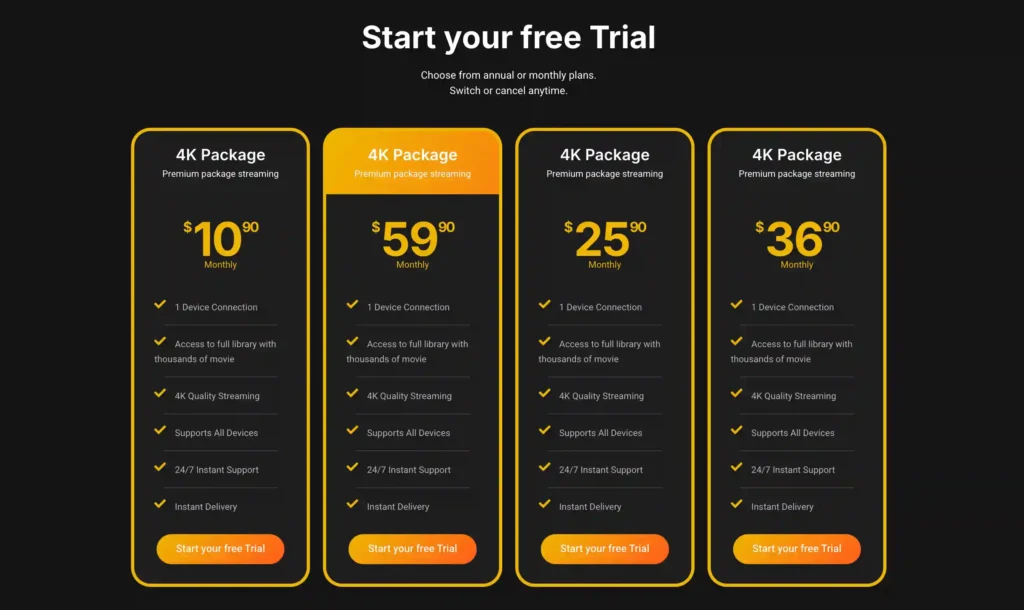
A free trial is available for eligible new users. Subscription prices and promotions can change, so it’s recommended to check the official official VibeCastTV website.
Why Stable Servers Do Not Guarantee Buffer-Free Streaming
Server quality is only one part of the playback chain.
Home-network limitations
Streaming may become unstable when:
- The television is far from the router
- Several walls weaken the signal
- Nearby wireless networks cause interference
- Multiple devices are downloading or uploading
- The router is overloaded
- A range extender repeats a weak connection
Apple advises temporarily pausing other internet activity when streaming quality deteriorates. Hulu recommends at least 8 Mbps for live streams, while Apple lists 8 Mbps or faster for HD streaming. These are service-specific reference points, not guarantees for unrelated providers.
Device and application problems
A fast internet plan cannot compensate for:
- Low device storage
- Excessive background applications
- An outdated operating system
- An outdated media player
- Overheating
- Unsupported video codecs
- Application crashes
- Corrupted temporary files
Google recommends restarting slow Google TV devices and closing unnecessary background applications.
Account and simultaneous-stream limits
Playback may stop when:
- Too many devices are connected
- The subscription has expired
- The provider limits the account to one stream
- Login credentials are entered incorrectly
- A reseller deactivates or replaces an account
- Geographic or household restrictions apply
This can appear to be a server problem even when the infrastructure is operating normally.
Source-feed failures
If one channel fails while the rest of the service works, the problem may be connected to the individual feed rather than the entire server network.
A provider cannot create a stable stream from an unavailable or defective source.
Can an IPTV Provider Prove Its Servers Are Stable?
A reliability claim should be matched with appropriate evidence.
Strong evidence
The strongest available evidence may include:
- Public service-level terms
- Defined measurement periods
- Status-page history
- Documented maintenance procedures
- Independent monitoring
- Reproducible testing records
- Device, connection and location details
- Peak-hour observations
- Public incident reports
- Transparent limitations
Partial evidence
Useful but incomplete signals include:
- Clear infrastructure descriptions
- Published speed guidance
- Official applications
- Identifiable technical support
- Documented device compatibility
- Realistic troubleshooting information
These show operational maturity but do not prove uptime.
Weak or unsupported evidence
The following should not be treated as proof:
- “Anti-freeze technology”
- “Premium servers”
- “Global servers”
- A server-map graphic
- Testimonials without verification
- Social-media comments
- Five-star icons
- A professional website
- Large channel counts
- Exact uptime without methodology
- “No buffering guaranteed”
IPTV Server Claim Versus Required Proof
| Provider claim | Evidence a reader should look for | What the claim does not prove |
|---|---|---|
| 99.9% uptime | Measurement period, monitoring method, exclusions and historical records | That every channel or device had 99.9% availability |
| Global server network | Named regions, CDN documentation or infrastructure explanation | Licensing, capacity or local performance |
| Automatic backup servers | Description of failover process and incident recovery | That every feed has a backup |
| Anti-buffering technology | Adaptive bitrate details, supported players and technical explanation | Permanent interruption-free playback |
| Optimized for sports | Peak-event testing methodology and supported-event details | Rights to every league or game |
| 24/7 support | Working contact methods and documented response process | Immediate resolution |
| Unlimited devices | Clear simultaneous-stream terms | Unlimited concurrent playback |
| 4K stability | Supported events, bitrate, devices and connection requirements | That all content is native 4K |
How to Identify Where Streaming Instability Begins
| Symptom | Most likely category | First useful check |
|---|---|---|
| Every streaming app buffers | Home network or ISP | Test another device and restart the network equipment |
| One application buffers | Application, account or provider | Restart and update the affected application |
| One channel buffers | Source feed or provider | Report the exact channel and time |
| The same account works on another device | Device or application | Restart, update and check available storage |
| Ethernet works but Wi-Fi does not | Wireless signal or interference | Improve router placement or Wi-Fi coverage |
| Playback stops when another device connects | Account or network capacity | Confirm simultaneous-stream limits |
| Problems occur only during major events | Provider or network congestion | Compare another lawful service on the same connection |
| Service fails on different devices and networks | Provider, feed or account | Contact official support with the recorded evidence |
| Unexpected payment warning appears | Billing issue or phishing | Open the official account page directly |
Samsung’s Smart Hub Connection Test can help distinguish problems involving the television, internet provider, Samsung services, and application platform.
How to Evaluate an IPTV Service Before Paying
Verify the company identity
Check for:
- A clear operating-company name
- Verifiable contact information
- Meaningful terms and conditions
- Privacy policy
- Billing information
- Cancellation instructions
- Refund rules
- Identifiable application developer
A domain name and messaging account are not sufficient proof of an accountable business.
Confirm content authorization
Server stability does not establish legality.
A technically reliable system can still distribute content without authorization. U.S. law addresses commercial services designed to stream copyrighted works without permission, and the Copyright Office distinguishes such conduct from lawful streaming technology.
When authorization cannot be independently confirmed, use this wording:
The provider’s content-licensing arrangements could not be independently verified from publicly available information.
Review official applications
Prefer applications distributed through:
- Device-manufacturer app stores
- Google Play
- Apple App Store
- Amazon Appstore
- A verifiable developer website
An official player does not prove that every subscription or playlist used inside it is authorized.
Enter only account information or playlist details supplied by a provider you are authorized to use. VibeCastTV does not provide playlists, server access, portal URLs, usernames, passwords, or television credentials.
Examine reliability information
Look for answers to these questions:
- Does the provider publish an outage process?
- Is support available through an official domain?
- Are recommended speeds documented?
- Are simultaneous-stream limits clear?
- Are device requirements specific?
- Are maintenance windows explained?
- Is there evidence behind any uptime percentage?
- Does the provider acknowledge limitations?
Understand trial and cancellation terms
A short trial can help reveal:
- App compatibility
- Login reliability
- Channel-loading behavior
- Device performance
- Basic support availability
It cannot prove annual stability, peak-event performance, licensing, or long-term uptime.
The Federal Trade Commission advises consumers to check how trials convert into paid subscriptions, confirm the renewal price, and make sure the cancellation method is clear before providing payment information.
How to Test Streaming Stability Responsibly
Record observations rather than relying on memory.
| Test item | What to record |
|---|---|
| Date and time | Include peak and off-peak periods |
| Device | Exact model and operating system |
| Application | Name and version |
| Connection | Ethernet, Wi-Fi or cellular |
| Speed result | Run on or near the actual device |
| Content | Channel, program or stream type |
| Resolution | Automatic, 720p, 1080p or 4K |
| Problem | Freeze, buffering, app crash or login error |
| Duration | How long the issue lasted |
| Comparison | Whether another lawful app worked |
| Support result | Response method and outcome |
Do not describe this as a scientific uptime test unless monitoring is continuous, the methodology is disclosed, and the sample is large enough to support the conclusion.
Practical Steps to Improve IPTV Stability
- Test the internet connection at the actual television or streaming device.
- Compare another lawful streaming application.
- Fully close and reopen the affected application.
- Restart the streaming device.
- Pause major downloads, cloud backups and additional high-resolution streams.
- Try Ethernet when the device and location permit it.
- Update the operating system and application.
- Test a lower resolution temporarily.
- Confirm the account’s simultaneous-stream limit.
- Check the official service-status page or support channel.
- Record the affected channel, time and error message.
- Contact the party responsible for the failing layer.
Do not immediately factory-reset the device, erase all application data, change DNS settings, or enable unknown application sources. Those actions may remove settings or introduce new problems without addressing the cause.
Provider Warning Signs
Use additional caution when a provider:
- Guarantees permanent zero buffering
- Advertises precise uptime without a method
- Claims every premium channel worldwide
- Promises no sports blackouts
- Hides the company identity
- Uses only informal messaging applications
- Requires an unknown APK
- Requests shared credentials
- Accepts only irreversible payment methods
- Offers unusually cheap lifetime access
- Has no cancellation procedure
- Cannot explain renewal conditions
- Recommends bypassing subscriptions
- Claims a VPN makes unauthorized access legal
- Uses fake countdown timers
- Has no status or support process
- Refuses to describe how performance was evaluated
Unexpected messages saying a streaming account will be suspended may be phishing attempts. Contact the company through a website or telephone number you already know rather than clicking the message link.
Limitations of This Guide
This article does not provide:
- Hands-on provider testing
- Independently measured uptime
- Server-location verification
- Peak-event load testing
- Channel-count verification
- Licensing certification
- Customer-support response measurements
- Provider ratings
- Guaranteed performance predictions
Public documentation can help evaluate transparency, but it cannot replace long-term independent technical testing.
Frequently Asked Questions
Can an IPTV provider guarantee stable servers?
A provider can design for reliability, but it cannot responsibly guarantee uninterrupted playback across every channel, device, connection and location. Failures can occur at the content source, provider, internet, Wi-Fi, application, device or account layer.
What internet speed is needed for stable IPTV?
There is no universal requirement. Hulu recommends at least 8 Mbps for its live streams, and Apple lists 8 Mbps or faster for HD content. A household should allow additional capacity for multiple devices and fluctuating network conditions.
How do I know whether the provider server is the problem?
Provider-side evidence becomes stronger when the same service fails on different devices and connections while other lawful streaming applications work normally. One failing channel may indicate a source-feed problem rather than a complete server outage.
Is Ethernet better than Wi-Fi?
Ethernet commonly provides a more consistent local connection because it avoids wireless interference. It may improve home-network stability, but it cannot repair an unavailable provider server or defective content source.
Does a VPN improve server stability?
Not automatically. A VPN introduces another route between the device and the service and may add latency or reduce speed. It should not be treated as a default buffering fix.
A VPN does not make unauthorized streaming legal and may violate a platform’s terms when used to bypass geographic restrictions.
Does a high speed-test result prove the server is stable?
No. A speed test measures a short connection to a particular test endpoint. It does not establish the health of a provider’s application, account system, content source or delivery infrastructure.
Is an IPTV service legal if its servers are in the USA?
Server location does not prove authorization. The relevant question is whether the provider has permission to distribute the content it offers.
Final Recommendation
Treat “stable servers” as a claim that needs evidence, not as a product feature that can be accepted from a sales page.
Before paying, verify the company, authorization information, official applications, billing terms, device support, stream limits, outage process and testing methodology. During a trial, test the actual viewing device at different times and compare results with another lawful application.
When streaming becomes unstable, diagnose the full delivery chain. A new router cannot fix an overloaded provider, and changing providers cannot repair weak Wi-Fi.
Copyright and Lawful-Use Notice
Copyright and lawful-use notice: This article is intended for general education and lawful troubleshooting. VibeCastTV does not sell IPTV subscriptions, host television channels, provide streaming credentials, distribute playlists, or encourage copyright infringement. Readers should use only services and content they are authorized to access. Provider licensing, platform availability and streaming rights vary by country and may change over time.







