
Table of Contents
By KAVANI | Fact-checked: July 31, 2026
No single lawful IPTV-style service carries every NBA game in the United States in 2026. NBA League Pass is strongest for out-of-market games, ESPN Unlimited covers the ESPN and ABC package, Peacock carries NBCUniversal’s streaming package, and Prime Video carries Amazon exclusives. Local-team games may require a separate regional or team service, and blackouts still apply.
What “IPTV” Means in This Guide
IPTV broadly means television delivered through an internet connection rather than only through traditional cable, satellite, or an antenna.
Legitimate services such as NBA League Pass, ESPN, Peacock, and Prime Video use internet delivery. However, the word “IPTV” is also used by resellers offering large channel packages without clearly disclosing who operates the service or whether the content has been licensed.
This guide covers official and publicly documented streaming options. It does not recommend anonymous IPTV resellers or services whose NBA broadcasting authorization cannot be independently verified.
Where IPTV NBA Games Are Officially Shown in the USA
The NBA’s current U.S. media agreements began with the 2025–26 season and continue through 2035–36. National games are divided among Disney, NBCUniversal, and Amazon rather than being concentrated on one platform.
ESPN and ABC
Disney’s package includes approximately 80 regular-season games each season across ESPN and ABC. ABC continues to carry the NBA Finals.
ESPN Unlimited provides direct streaming access to ESPN’s full network lineup, including ESPN programming shown on ABC. Its publicly listed price was $29.99 per month or $299.99 per year when checked on July 31, 2026.
ABC may also be available over the air in supported locations, although reception depends on the viewer’s distance from a local station and the available signal.
NBC and Peacock
NBCUniversal’s package includes up to 100 regular-season games. The agreement includes Peacock-exclusive Monday doubleheaders, NBC Tuesday games, Sunday coverage later in the season, the NBA All-Star Game, playoff games, and rotating Conference Finals coverage.
Peacock Premium was listed at $10.99 per month or $109.99 per year on the research date. Peacock Select is cheaper but does not include live sports, so it should not be chosen for NBA access.
Game availability should still be checked against the final NBA schedule because NBC, Peacock-exclusive, and simulcast assignments can differ.
Prime Video
Amazon’s package includes 66 regular-season games, NBA Cup knockout games, the entire Play-In Tournament, playoff games, and a rotating Conference Finals series beginning with the 2026–27 season.
Prime Video is included with an Amazon Prime membership, publicly listed at $14.99 per month or $139 per year when checked. Viewers who already maintain Prime for other benefits may not face an additional subscription cost for included NBA games.
NBA League Pass and NBA TV
NBA League Pass is designed primarily for games outside the viewer’s local market. It is the most comprehensive official option for following multiple out-of-market teams, but it is not a replacement for every national or local broadcast.
The publicly listed U.S. options included:
- League Pass Standard: $16.99 per month
- League Pass Premium: $24.99 per month
- Team Pass: $13.99 per month
- NBA TV: $8.99 per month
Standard viewing supports one stream at a time, while Premium supports up to three simultaneous streams and additional viewing features. Prices and promotions can change during the season.
Nationally televised games are generally unavailable live through League Pass in the United States. Local-team games are also restricted in the team’s home market. Replays become available after the applicable delay, but League Pass should not be purchased on the assumption that it will show a local team live.
Local-Team Coverage
Local broadcast arrangements vary by team and ZIP code. Depending on the market, games may be available through:
- A regional sports network
- A local television station
- A team-operated streaming subscription
- A participating live-TV streaming service
- A cable or satellite package
These agreements change more frequently than national media rights. Check the NBA’s official viewing information and the team’s official website before subscribing.
Best NBA Streaming Option by Viewer Type
VibeCastTV: Best Stable IPTV Service For NBA
VibeCastTV is an IPTV subscription service designed for users who want to stream live television and on-demand entertainment across multiple devices. The platform focuses on providing an easy setup experience, flexible subscription plans, and compatibility with many popular IPTV applications.
Whether you’re looking for news, entertainment, sports programming, or international channels, VibeCastTV aims to offer a convenient streaming solution for users in the USA, Canada, and other supported regions.
Key Features
📺 Live Television
VibeCastTV provides access to a wide range of live television categories, including entertainment, news, lifestyle, children’s programming, and international content.
🎬 Video on Demand
Subscribers can browse a library of on-demand content, with new titles added periodically depending on availability.
🖥️ Multi-Device Compatibility
The service is compatible with many popular IPTV devices and applications, including:
- Amazon Fire TV & Fire Stick
- Android TV
- Android smartphones and tablets
- iPhone & iPad
- Windows PCs
- Mac computers
- Smart TVs
- IPTV Smarters
- TiviMate
- XCIPTV
- Other apps that support M3U playlists or Xtream Codes API
📡 Streaming Quality
Where supported by the source and internet connection, streams may be available in:
- HD
- Full HD (1080p)
- 4K Ultra HD
Actual quality may vary depending on content availability, device capabilities, and network performance.
⚡ Quick Setup
New customers receive setup information after subscribing, making it possible to start using the service in a short amount of time.
💬 Customer Support
VibeCastTV provides customer assistance for account setup, installation, and general service questions.
Services
Depending on the subscription plan, VibeCastTV may include access to:
- Live TV
- Entertainment channels
- News channels
- Sports programming
- Kids’ content
- International channels
- Video-on-Demand (VOD)
- Electronic Program Guide (where supported)
- Multi-device compatibility
- Setup assistance
Available content may vary over time.
Pricing
VibeCastTV offers several subscription lengths, allowing users to choose the option that best fits their needs.
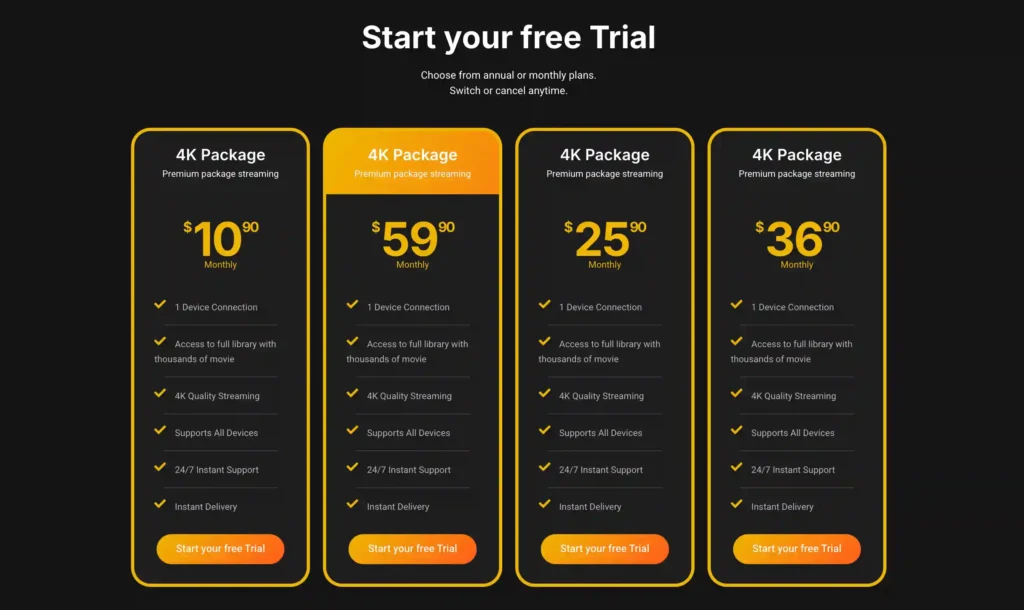
A free trial is available for eligible new users. Subscription prices and promotions can change, so it’s recommended to check the official official VibeCastTV website.
NBA Streaming Price Comparison
Prices below were checked on July 31, 2026 and may change.
| Service | Publicly listed monthly price | Primary NBA role | Main limitation |
| ESPN Unlimited | $29.99 | ESPN and ABC package, including Finals coverage | No NBCU or Amazon-exclusive package |
| Peacock Premium | $10.99 | Peacock exclusives and NBCUniversal NBA coverage | Exact assignments vary by schedule |
| Amazon Prime | $14.99 | Prime Video’s exclusive NBA package | No ESPN or Peacock exclusives |
| NBA League Pass Standard | $16.99 | Out-of-market games | Local and national blackouts |
| NBA League Pass Premium | $24.99 | Out-of-market games with added streaming features | Local and national blackouts |
| NBA TV | $8.99 | NBA TV programming and selected games | Does not provide every national or local game |
| Local-team service | Varies | In-market regular-season games | Availability depends on the team and location |
Official prices and package information were taken from ESPN, Peacock, Amazon, and NBA documentation.
How Much Broad NBA Coverage Can Cost
Combining the listed monthly prices for ESPN Unlimited, Peacock Premium, and a full Amazon Prime membership produces a national-package cost of approximately $55.97 per month before taxes.
A household that already pays for Amazon Prime would face approximately $40.98 per month in additional listed costs for ESPN Unlimited and Peacock Premium.
Adding NBA League Pass Standard brings the combined listed total to approximately $72.96 per month. Even that combination may not show a local team live because League Pass local-market restrictions still apply.
These figures are a comparison snapshot, not a recommendation to maintain every subscription throughout the year. Viewers can reduce costs by checking the schedule and subscribing only during the months that contain the games or events they intend to watch.
How to Choose the Right Combination
You Follow an Out-of-Market Team
Start with NBA Team Pass or League Pass. Then check how many of the team’s games appear nationally on ESPN, ABC, NBC, Peacock, or Prime Video.
A nationally selected game may require the national rights holder instead of League Pass.
You Follow Your Local Team
Do not begin with League Pass. First enter your ZIP code into an official NBA viewing tool or check the team’s official broadcast page.
The correct service may be a local station, regional network, team subscription, or supported live-TV provider.
You Mainly Watch Nationally Televised Games
Concentrate on the three national packages:
- ESPN Unlimited for ESPN and ABC
- Peacock Premium for Peacock and relevant NBCUniversal coverage
- Prime Video for Amazon-exclusive games
Check whether ABC and NBC are available through an antenna in your area before paying for a service solely for broadcast-network games.
You Only Watch Major Events
The required service changes by event:
- NBA Finals: ABC and Disney’s package
- NBA All-Star events: NBCUniversal package
- NBA Cup knockout games: Prime Video package
- NBA Play-In Tournament: Prime Video package
- Conference Finals: Assigned among rights holders according to the season’s rotation
Confirm the specific event schedule before subscribing.
How NBA Blackouts Work
A blackout does not necessarily mean that no legal stream exists. It usually means another broadcaster has the exclusive live rights in the viewer’s location.
Local blackout: A local team’s game is unavailable live through League Pass because a local broadcaster or team service owns the in-market rights.
National restriction: A game is carried nationally by ESPN, ABC, NBC, Peacock, or Prime Video and is therefore unavailable live through the standard U.S. League Pass feed.
Location mismatch: The service cannot confirm the viewer’s location or detects account activity inconsistent with its regional rules.
Delayed replay: The game becomes available through League Pass only after the relevant live restriction ends.
A VPN does not make unauthorized streaming legal. Using one to defeat a blackout or geographic restriction may also violate the platform’s terms.
How to Set Up Official NBA Streaming
- Identify the game.
Check the date, teams, and whether the game is nationally televised. - Check local availability.
Use the NBA or team’s official viewing information and enter the correct ZIP code when requested. - Select the required service.
Match the listed broadcaster to ESPN, Peacock, Prime Video, League Pass, or the local provider. - Install the official application.
Use the device’s official app store or the platform’s verified website. - Review the subscription terms.
Confirm the price, renewal date, cancellation process, supported devices, and simultaneous-stream limit. - Enable required location permissions.
Sports applications may need location access to enforce market restrictions. - Test access before tipoff.
Sign in, update the application, and confirm that the intended game appears in the schedule.
Enter only account details supplied by a service you are authorized to use. VibeCastTV does not provide playlists, portal URLs, server access, usernames, passwords, or television credentials.
NBA Streaming Troubleshooting
| Problem | Likely cause | Recommended action |
| The game is missing | Wrong platform or schedule assignment | Check the NBA’s official viewing information and the broadcaster’s schedule |
| “Not available in your area” | Local or national restriction | Identify the rights holder for the viewer’s ZIP code |
| League Pass blocks a local game | In-market blackout | Use the official local broadcaster or team service |
| Video buffers repeatedly | Home network, device, or application problem | Test another application, restart the router, reduce competing traffic, and update the streaming app |
| Application closes or freezes | Low storage, outdated software, or corrupted temporary files | Restart the device, install updates, and clear cache only when appropriate |
| Sign-in fails | Account, billing, or password problem | Reset the password and verify that the subscription is active |
| Stream-limit warning | Too many simultaneous devices | Sign out of unused devices and check the plan’s stream limit |
| Location cannot be verified | Disabled location services or network mismatch | Enable accurate location access and avoid tools that mask the location |
| The picture is low quality | Automatic quality adjustment or insufficient bandwidth | Use Ethernet when possible, improve Wi-Fi placement, and reduce other network activity |
Avoid immediately reinstalling an application, clearing all data, changing DNS settings, or disabling security protections. First determine whether the problem affects one game, one application, one device, or the entire connection.
Warning Signs of an Unverified IPTV Seller
Approach a service cautiously when it:
- Claims to provide every U.S. sports network and every local market.
- Promises no blackouts under any circumstances.
- Does not identify the operating company.
- Provides no meaningful terms, privacy policy, or refund process.
- Accepts only difficult-to-reverse payment methods.
- Requires an unofficial or modified application.
- Sends server credentials without explaining the content source.
- Uses copied broadcaster logos or channel lists as proof of authorization.
- Claims that a VPN makes access legal.
- Guarantees permanent access or “unbannable” service.
- Pressures the buyer to pay immediately.
- Treats positive customer comments as proof of licensing.
A professional-looking website, app, payment form, or customer-support account does not establish that a service possesses the required content rights.
When licensing cannot be independently verified, the safest conclusion is:
The provider’s content-licensing arrangements could not be independently verified from publicly available information.
Research Methodology and Limitations
This guide is based on official NBA rights announcements, NBA League Pass information, current platform documentation, publicly listed pricing, and independent editorial research.
VibeCastTV did not conduct hands-on playback, billing, cancellation, picture-quality, latency, or customer-support testing for this article.
Additional limitations include:
- Local-team availability was not checked for every U.S. ZIP code.
- Prices and promotions can change after publication.
- The 2026–27 game-by-game broadcast schedule should be checked again before the season.
- Device compatibility can change with application updates.
- A service’s inclusion in an app store does not independently prove content licensing.
- The guide cannot determine whether an unnamed IPTV reseller possesses private licensing agreements.
Frequently Asked Questions
Is IPTV legal for watching NBA games?
IPTV technology itself is legal. Official services use internet delivery to stream authorized content. The legal concern is whether a particular provider has permission to distribute the games it sells.
Can NBA League Pass show my local team live?
Usually not when the viewer is inside that team’s designated local market. The local broadcaster or official team streaming option normally controls live in-market access.
Does League Pass include nationally televised games live?
Nationally televised U.S. games are generally restricted from live League Pass viewing. The viewer normally needs the platform carrying that national game.
Do I need ESPN, Peacock, and Prime Video?
Only when the goal is broad access across all three national rights packages. A viewer interested in one team or selected events may need fewer subscriptions.
What is the cheapest legal way to watch the NBA?
The least expensive setup depends on the team and games. An antenna may receive available ABC or NBC broadcasts, an existing Prime membership may already include Amazon games, and a short-term subscription may be cheaper than maintaining every service year-round.
Can I use a VPN to avoid NBA blackouts?
This guide does not recommend using a VPN to defeat sports blackouts or geographic restrictions. A VPN does not change the licensing rules and may violate the streaming service’s terms.
Does NBA TV include every NBA game?
No. NBA TV offers selected games and league programming, but it does not replace League Pass, local-team coverage, or the ESPN, NBCUniversal, and Amazon packages.
Final Recommendation
For most out-of-market fans, NBA League Pass is the logical starting point. For national coverage, viewers should compare ESPN Unlimited, Peacock Premium, and Prime Video according to the published schedule. Local-team fans should identify their in-market broadcaster before purchasing League Pass.
Avoid any provider that promises every NBA game, every local channel, and no blackouts without publishing verifiable information about the company and its content authorization.
Copyright and lawful-use notice: This article is intended for general education and lawful troubleshooting. VibeCastTV does not sell IPTV subscriptions, host television channels, provide streaming credentials, distribute playlists, or encourage copyright infringement. Readers should use only services and content they are authorized to access. Provider licensing, platform availability, and streaming rights vary by country and may change over time.
10. Disclosure section
Independent research disclosure
This article was prepared using official league announcements, streaming-platform documentation, publicly listed terms, and independent editorial research.
Testing disclosure
VibeCastTV did not perform hands-on playback, billing, application-performance, cancellation, or customer-support testing for this article. No performance score, uptime figure, picture-quality measurement, or first-person testing claim is included.
Affiliate disclosure
No affiliate relationship has been assumed in this draft. When affiliate links are added, VibeCastTV should disclose the relationship and mark qualifying links with rel="sponsored".
Suggested disclosure when applicable:
Affiliate disclosure: VibeCastTV may earn a commission from qualifying purchases made through certain links. This does not increase the price paid by the reader. Commercial relationships do not replace the evaluation criteria explained in this article.
Copyright and lawful-use notice
This article is intended for general education and lawful troubleshooting. VibeCastTV does not sell IPTV subscriptions, host television channels, provide streaming credentials, distribute playlists, or encourage copyright infringement. Readers should use only services and content they are authorized to access. Provider licensing, platform availability, and streaming rights vary by country and may change over time.







