
By KAVANI | Fact-checked: July 26, 2026
Direct Answer
IPTV can work with Xbox setups in the USA, but availability depends on the applications, streaming platforms, and services supported by the Xbox ecosystem. Xbox consoles are designed mainly for gaming and official entertainment apps, so many users may prefer dedicated streaming devices for broader IPTV player compatibility. The safest approach is to use authorized streaming services and trusted applications.
Searching for IPTV for Xbox USA can be confusing because IPTV describes a delivery method rather than a specific type of service.
Internet Protocol Television (IPTV) allows television content to be delivered through an internet connection instead of traditional cable or satellite infrastructure. However, the technology itself does not determine whether a service is authorized. The legality depends on whether the provider has permission to distribute the content it offers.
Xbox users often want to know:
- Can Xbox run IPTV apps?
- Is IPTV available on Xbox One or Xbox Series X|S?
- Which streaming options work best?
- Is IPTV legal in the United States?
- Why does IPTV sometimes buffer or fail?
This guide explains how IPTV technology works with Xbox, what setup options are available, and what users should consider before choosing a streaming solution.
VibeCastTV is an independent streaming-technology publication covering IPTV setup guides, streaming applications, device tutorials, troubleshooting, comparisons, and consumer-safety information.
VibeCastTV does not sell IPTV subscriptions, provide television channels, distribute playlists, provide account credentials, or host streaming content.
Table of Contents
Can You Use IPTV for Xbox in the USA?
Yes, Xbox users can access internet-based television services, but the experience depends on the available applications and streaming platforms.
Unlike some Android-based streaming devices, Xbox has a more controlled application environment. Not every IPTV player available for smart TVs or Android devices is available on Xbox.
Xbox users generally rely on:
- Official streaming applications
- Supported media applications
- Browser-based streaming where available
- External streaming devices connected to the same television setup
The Xbox console itself does not automatically provide IPTV channels. Users need an authorized streaming service and a compatible playback method.
Understanding IPTV Technology
What Is IPTV?
IPTV delivers television content through internet protocols.
Common IPTV features include:
- Live television streaming
- Video-on-demand content
- Electronic Program Guides (EPG)
- Internet-based media playback
IPTV can be used by legitimate streaming platforms, broadcasters, and authorized television providers.
However, unauthorized services may also misuse IPTV technology to distribute copyrighted content without permission.
The technology is not the deciding factor — the content rights and provider authorization are.
Best IPTV Service For Xbox Users 2026 (Tested & Verified)
VibeCastTV Review (2026): IPTV Service for Xbox Users & Streaming Entertainment
VibeCastTV is an IPTV subscription service designed for users who want to stream live television and on-demand entertainment across multiple devices. The platform focuses on providing an easy setup experience, flexible subscription plans, and compatibility with many popular IPTV applications.
Whether you’re looking for news, entertainment, sports programming, or international channels, VibeCastTV aims to offer a convenient streaming solution for users in the USA, Canada, and other supported regions.
Key Features
📺 Live Television
VibeCastTV provides access to a wide range of live television categories, including entertainment, news, lifestyle, children’s programming, and international content.
🎬 Video on Demand
Subscribers can browse a library of on-demand content, with new titles added periodically depending on availability.
🖥️ Multi-Device Compatibility
The service is compatible with many popular IPTV devices and applications, including:
- Amazon Fire TV & Fire Stick
- Android TV
- Android smartphones and tablets
- iPhone & iPad
- Windows PCs
- Mac computers
- Smart TVs
- IPTV Smarters
- TiviMate
- XCIPTV
- Other apps that support M3U playlists or Xtream Codes API
📡 Streaming Quality
Where supported by the source and internet connection, streams may be available in:
- HD
- Full HD (1080p)
- 4K Ultra HD
Actual quality may vary depending on content availability, device capabilities, and network performance.
⚡ Quick Setup
New customers receive setup information after subscribing, making it possible to start using the service in a short amount of time.
💬 Customer Support
VibeCastTV provides customer assistance for account setup, installation, and general service questions.
Services
Depending on the subscription plan, VibeCastTV may include access to:
- Live TV
- Entertainment channels
- News channels
- Sports programming
- Kids’ content
- International channels
- Video-on-Demand (VOD)
- Electronic Program Guide (where supported)
- Multi-device compatibility
- Setup assistance
Available content may vary over time.
Pricing
VibeCastTV offers several subscription lengths, allowing users to choose the option that best fits their needs.
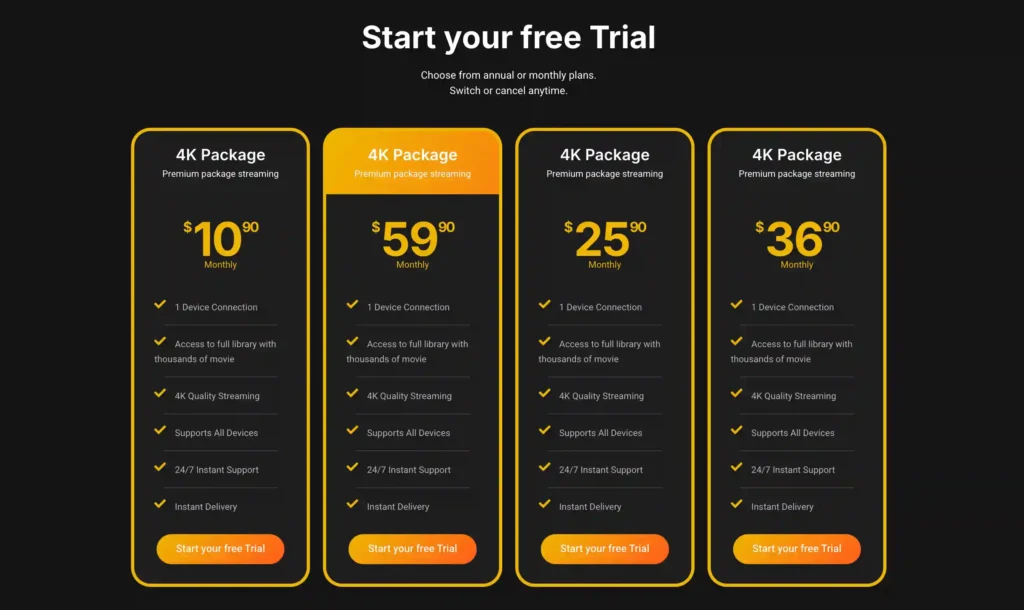
A free trial is available for eligible new users. Subscription prices and promotions can change, so it’s recommended to check the official VibeCasttv
IPTV Setup Options for Xbox Users
Option 1: Use Official Xbox Streaming Applications
The simplest approach is using applications available through official Xbox channels.
Possible categories include:
- Live television apps
- Sports streaming apps
- Subscription streaming platforms
- Network-specific applications
Advantages
- Easier installation
- Regular updates
- Better account security
- Reduced risk from unsafe software
Limitations
- App availability changes
- Not every IPTV player supports Xbox
- Regional restrictions may apply
Option 2: Use Xbox With Another Streaming Device
Many IPTV users combine Xbox gaming with a separate streaming device.
| Device | Main Advantage | Limitation |
|---|---|---|
| Xbox Series X/S | Gaming and entertainment in one device | Limited IPTV-specific apps |
| Fire TV devices | Large streaming ecosystem | Requires another device |
| Android TV devices | Wider player compatibility | Additional hardware cost |
| Smart TVs | Convenient built-in apps | Hardware support varies |
For users who mainly want gaming, Xbox may be enough. Users focused heavily on IPTV applications may prefer dedicated streaming hardware.
Option 3: Browser-Based Streaming
Some authorized services offer web-based playback.
This option may work when:
- No dedicated Xbox app exists
- The service supports browser streaming
- The account is authorized
However, browser playback may not provide the same features as a dedicated application.
What You Need Before Setting Up IPTV for Xbox
1. A Compatible Xbox Console
Common Xbox devices include:
- Xbox Series X
- Xbox Series S
- Xbox One
Application support can change over time, so users should check current availability through official Xbox sources.
2. A Stable Internet Connection
Streaming performance depends on:
- Internet speed
- Wi-Fi quality
- Router performance
- Network congestion
- Streaming resolution
A fast internet plan does not always solve buffering if the home network is unstable.
3. An Authorized Streaming Account
Only use:
- Your own account details
- Credentials from services you are authorized to access
- Official subscription information
Avoid services that provide:
- Shared passwords
- Unknown login details
- Unclear account ownership
- Suspicious access methods
Choosing an IPTV Player or Streaming Application
Before installing any IPTV-related application, check:
Application Source
Prefer:
- Official app stores
- Verified developers
- Recognized streaming platforms
Avoid:
- Unknown download websites
- Modified applications
- Cracked software
- Apps promising unlimited premium channels
Developer Transparency
Look for:
- Developer information
- Privacy policies
- Support channels
- Update history
A professional-looking application does not automatically prove that the content source is legitimate.
Xbox IPTV Troubleshooting Guide
IPTV Buffering Problems
| Possible Cause | Explanation | Solution |
|---|---|---|
| Weak Wi-Fi | Wireless instability affects playback | Improve network connection |
| Network congestion | Other devices consume bandwidth | Reduce unnecessary usage |
| Application problem | App may have errors | Restart or update the app |
| Service issue | Provider-side problems may occur | Check official service information |
IPTV Login Problems
Common causes:
- Incorrect login details
- Expired subscription
- Account restrictions
- Service interruptions
Recommended steps:
- Confirm your account information.
- Check subscription status.
- Use official recovery options.
- Contact the service provider through official channels.
Playback Errors
Try:
- Restarting Xbox
- Updating applications
- Checking network settings
- Restarting your router
Avoid installing unofficial versions of applications as troubleshooting solutions.
Is IPTV Legal in the USA?
IPTV technology itself is legal in the United States.
The important question is whether the service has authorization to provide the content it offers.
Before choosing a provider, consider:
- Company identity
- Terms of service
- Privacy policy
- Payment practices
- Customer support options
- Licensing information where available
Warning Signs
Be cautious of services that advertise:
- Every premium channel package
- Extremely low prices
- Anonymous ownership
- Unclear business information
- Payment methods with little protection
A website disclaimer alone does not prove that a service has the necessary rights to distribute content.
Xbox vs Dedicated Streaming Devices
| Category | Xbox | Dedicated Streaming Device |
|---|---|---|
| Gaming | Excellent | Limited |
| Streaming apps | Good | Often broader |
| IPTV player flexibility | May be limited | Often stronger |
| Setup simplicity | Convenient for gamers | Designed mainly for streaming |
The best choice depends on whether gaming or streaming flexibility is the priority.
Security Tips for IPTV Users
Follow these practices:
- Download applications from trusted sources
- Keep Xbox software updated
- Use strong passwords
- Avoid sharing account information
- Check provider transparency
- Avoid suspicious “free premium” offers
Protecting your account information is especially important because streaming accounts may contain payment details and personal information.
Related Reader Questions
Can you install IPTV apps directly on Xbox?
Only applications supported by the Xbox platform can be installed directly. Availability depends on the current Xbox application ecosystem.
Does Xbox support every IPTV player?
No. IPTV players available on Android, Fire TV, or smart TVs may not be available on Xbox.
Is IPTV illegal?
No. IPTV is a technology. The legality depends on whether the service has permission to distribute the content it provides.
Is Xbox good for IPTV?
Xbox can work for some streaming needs, but dedicated streaming devices may provide more IPTV-focused features.
Why does IPTV buffer on Xbox?
Buffering can be caused by network problems, application issues, device limitations, or service-side problems.
Conclusion
IPTV for Xbox USA is possible, but users should understand the limitations of gaming consoles as streaming platforms.
Xbox works well for users who want gaming and entertainment in one device. However, people who need specialized IPTV features may prefer dedicated streaming hardware.
The safest approach is choosing transparent services, using official applications, protecting account information, and accessing only content you are authorized to watch.
Copyright and Lawful-Use Notice
This article is intended for general education and lawful troubleshooting. VibeCastTV does not sell IPTV subscriptions, host television channels, provide streaming credentials, distribute playlists, or encourage copyright infringement. Readers should use only services and content they are authorized to access. Provider licensing, platform availability, and streaming rights vary by country and may change over time.







