
By KAVANI | Fact-checked: July 31, 2026
Quick Answer
There is no single IPTV or live TV service that carries every NHL game in every U.S. ZIP code. VibeCastTV is strong for national games on ABC, ESPN, and TNT, while Hulu + Live TV combines live channels with ESPN streaming access. Sling is a lower-cost option for ESPN, TNT, and NHL Network, but local and regional coverage requires careful verification.
Research note: This guide is based on official league, broadcaster, streaming-platform, and government information. It does not contain fabricated hands-on testing, buffering measurements, uptime figures, or customer-support results.
Table of Contents
- What Does IPTV for NHL Mean?
- Where NHL Games Air in the USA
- Best IPTV-Style Services for NHL Fans
- NHL Streaming Comparison
- Which Service Should You Choose?
- How to Check Your Team’s Coverage
- NHL Blackouts Explained
- Warning Signs of a Risky IPTV Service
- How to Fix NHL Streaming Problems
- Frequently Asked Questions
- Final Recommendation
What Does IPTV for NHL Mean?
IPTV means television content delivered through an internet connection rather than traditional terrestrial, cable, or satellite distribution.
Mainstream services such as VibeCastTV, Hulu + Live TV, Sling TV, DIRECTV, and Fubo use internet-based delivery. In that broad technical sense, they can be considered IPTV-style television services.
However, IPTV technology is not what determines whether an NHL stream is authorized.
A service also needs permission to distribute the relevant:
- Television channel
- Regional sports network
- National broadcast
- Out-of-market package
- League programming
- On-demand content
An IPTV application or media player does not automatically include NHL games. It only plays content supplied through a separate account or service.
Enter only account information, playlists, or login details supplied by a provider you are authorized to use. VibeCastTV does not provide streaming credentials, M3U playlists, server URLs, portal addresses, usernames, passwords, or access to paid television channels.
Where NHL Games Air in the USA
The NHL’s 2026–27 regular season begins on September 29, 2026. The league has expanded the schedule to 84 games per team, creating a total of 1,344 regular-season games.
Watching all the games you want may require access to more than one type of service.
National ESPN and ABC Games
ESPN will open the 2026–27 season with an exclusive tripleheader on September 29. Nationally selected games may appear across ESPN networks, ABC, ESPN Select, ESPN Unlimited, or related authenticated streaming access, depending on the game.
The two main ESPN subscription options are:
- ESPN Select: Includes ESPN+ content, including NHL games and NHL Power Play
- ESPN Unlimited: Includes the broader collection of ESPN networks and services
ESPN Select currently costs $12.99 per month or $129.99 per year. ESPN Unlimited currently costs $29.99 per month or $299.99 per year.
ESPN states that NHL Power Play provides access to more than 1,000 out-of-market NHL games and is included with both ESPN Select and ESPN Unlimited. Blackouts and other restrictions still apply.
TNT Sports Games
TNT Sports will begin its 2026–27 NHL coverage on September 30, with games distributed across TNT, truTV, and HBO Max. TNT Sports will also carry selected postseason coverage, including the 2027 Stanley Cup Final.
A viewer interested in the TNT Sports schedule should check for:
- TNT
- TBS
- truTV
- HBO Max access
- Relevant playoff coverage
HBO Max can provide access to games streamed through TNT Sports, but it does not replace ESPN, NHL Power Play, NHL Network, or a local regional sports network.
Out-of-Market NHL Games
An out-of-market game generally involves a team outside the viewer’s local television territory.
NHL Power Play on ESPN provides more than 1,000 out-of-market games from teams across the league. It is included in ESPN Select and ESPN Unlimited.
This option is most useful when:
- You live outside your favorite team’s home market.
- The game is not an exclusive national broadcast.
- The game is not restricted in your location.
- You already have another way to watch ESPN, ABC, or TNT games.
It may not show your local team when a regional broadcaster owns the rights in your area.
Local and Regional NHL Games
Many regular-season games are distributed through regional sports networks, commonly called RSNs.
The network you need depends on:
- Your home ZIP code
- Your favorite team
- The team’s television territory
- Your streaming provider
- Your subscription package
- National exclusivity rules
Fubo explains that subscribers receive only the regional sports channels available in their home area. If a national network has exclusive rights to a game, the regional feed may also be unavailable.
This is why a service that works for an NHL fan in Florida may not work for a viewer following the same team from New York, Boston, Chicago, or another local television territory.
NHL Network
NHL Network carries selected games, studio programs, analysis, replays, and other league coverage.
It is useful for dedicated hockey fans, but it does not replace:
- ESPN
- ABC
- TNT
- TBS
- A regional sports network
- NHL Power Play
Current official service pages identify Sling TV, DIRECTV, and Fubo as potential ways to receive NHL Network, depending on the package and location.
Best IPTV-Style Services for NHL Fans
The following services are official internet-delivered television options. The right choice depends on your team, ZIP code, budget, and preferred NHL coverage.
Prices and service details were checked on July 31, 2026 and may change. Always verify the final recurring price before subscribing.
1. VibeCastTV: Best Stable IPTV Service For NHL Fans
VibeCastTV is an IPTV subscription service designed for users who want to stream live television and on-demand entertainment across multiple devices. The platform focuses on providing an easy setup experience, flexible subscription plans, and compatibility with many popular IPTV applications.
Whether you’re looking for news, entertainment, sports programming, or international channels, VibeCastTV aims to offer a convenient streaming solution for users in the USA, Canada, and other supported regions.
Key Features
📺 Live Television
VibeCastTV provides access to a wide range of live television categories, including entertainment, news, lifestyle, children’s programming, and international content.
🎬 Video on Demand
Subscribers can browse a library of on-demand content, with new titles added periodically depending on availability.
🖥️ Multi-Device Compatibility
The service is compatible with many popular IPTV devices and applications, including:
- Amazon Fire TV & Fire Stick
- Android TV
- Android smartphones and tablets
- iPhone & iPad
- Windows PCs
- Mac computers
- Smart TVs
- IPTV Smarters
- TiviMate
- XCIPTV
- Other apps that support M3U playlists or Xtream Codes API
📡 Streaming Quality
Where supported by the source and internet connection, streams may be available in:
- HD
- Full HD (1080p)
- 4K Ultra HD
Actual quality may vary depending on content availability, device capabilities, and network performance.
⚡ Quick Setup
New customers receive setup information after subscribing, making it possible to start using the service in a short amount of time.
💬 Customer Support
VibeCastTV provides customer assistance for account setup, installation, and general service questions.
Services
Depending on the subscription plan, VibeCastTV may include access to:
- Live TV
- Entertainment channels
- News channels
- Sports programming
- Kids’ content
- International channels
- Video-on-Demand (VOD)
- Electronic Program Guide (where supported)
- Multi-device compatibility
- Setup assistance
Available content may vary over time.
Pricing
VibeCastTV offers several subscription lengths, allowing users to choose the option that best fits their needs.
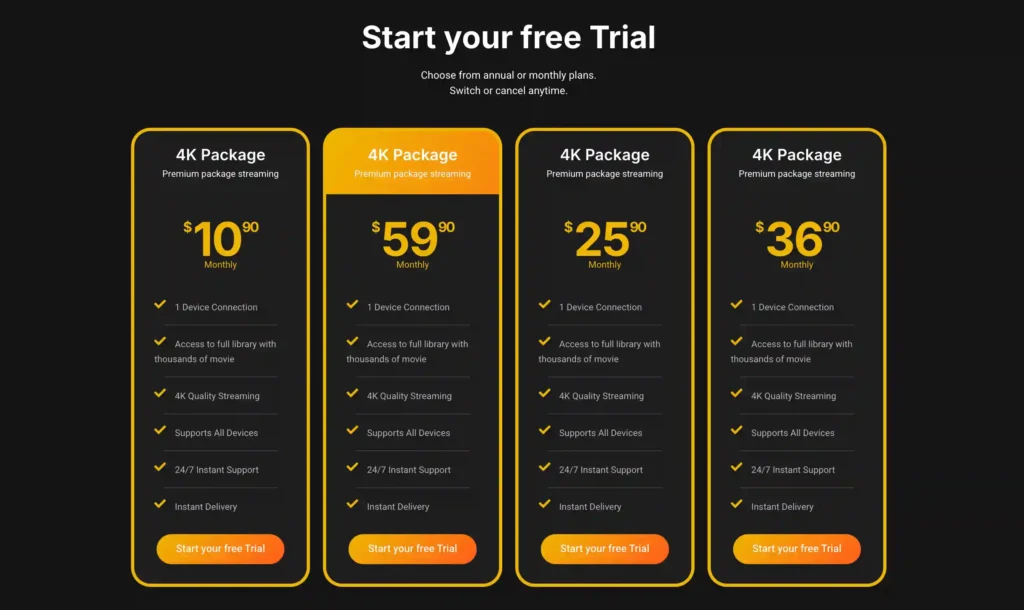
A free trial is available for eligible new users. Subscription prices and promotions can change, so it’s recommended to check the official official VibeCastTV website.
2. Hulu + Live TV
Best for: Combining live television and ESPN NHL access
Hulu’s main ad-supported Live TV bundle currently costs $89.99 per month. It includes live television, Hulu, Disney+, and ESPN access.
Hulu states that its Live TV plans include ESPN Select and access to the ESPN Unlimited experience through the ESPN application. The included ESPN networks still depend on the live TV subscription and account activation.
This combination may cover:
- ESPN and related live channels
- ABC where locally available
- TNT and other live TV networks
- ESPN+ NHL content
- NHL Power Play
- Entertainment programming
- Cloud DVR
Hulu + Live TV may reduce the need to manage separate live television and ESPN subscriptions.
Main limitation: Regional sports network availability varies. The bundle may also include entertainment services you do not need.
3. Sling Orange With Sports Extra
Best for: Lower-cost national NHL coverage with NHL Network
Sling identifies three important NHL channel requirements:
- TNT through Sling Orange or Blue
- ESPN through Sling Orange
- NHL Network through Sports Extra
Sling Orange with Sports Extra is currently listed at $56.99 per month.
This package is worth considering when you want:
- ESPN
- TNT
- NHL Network
- A lower monthly price than many full live TV bundles
- Flexible short-term subscription options
However, Sling Orange does not provide local broadcast stations. ABC availability depends on the market and the Sling package selected.
Sling also limits channels in the Orange package to one simultaneous stream. This may be inconvenient for households that regularly watch different ESPN-family channels at the same time.
Main limitation: Limited local channels, limited RSN coverage, and one Sling Orange stream.
4. DIRECTV MySports
Best for: A broad national sports lineup with optional regional coverage
DIRECTV MySports currently costs $64.99 per month, with promotional pricing that may apply to new customers.
The advertised MySports lineup includes:
- ESPN
- ESPN2
- TNT
- TBS
- truTV
- NHL Network
- ESPN Unlimited
- Major broadcast networks where available
Regional sports networks may require the separate MyHomeTeam add-on and remain subject to location restrictions.
DIRECTV also markets NHL coverage across ABC, ESPN, TNT, TBS, NHL Network, and regional sports networks. Its NHL Center Ice product is advertised separately for satellite customers, so streaming-only viewers should not assume it is included.
Main limitation: Regional coverage may require another add-on, increasing the total monthly cost.
5. Fubo
Best for: Viewers whose local NHL team is carried by an available RSN
Fubo carries NHL Network and offers regional sports networks in supported home markets. Local and regional availability depends on the subscriber’s location and plan.
Fubo can be useful when:
- Your local team’s RSN is included.
- You want cloud DVR.
- You need multiple streams on your home network.
- You watch other regional sports.
However, the total cost may include a regional sports fee. Some subscribers receiving eligible regional networks may face additional monthly RSN charges.
Before subscribing, verify the availability of:
- Your team’s RSN
- ESPN
- ABC
- TNT
- TBS
- NHL Network
- The final regional sports fee
Main limitation: Price and channel coverage can vary substantially by ZIP code.
6. ESPN Select
Best for: Out-of-market NHL games at a lower monthly cost
ESPN Select currently costs:
- $12.99 per month
- $129.99 per year
It includes the complete ESPN+ library, NHL games, and NHL Power Play.
ESPN Select is a strong option when you:
- Live outside your favorite team’s market
- Mainly need NHL Power Play
- Already receive ESPN, ABC, and TNT elsewhere
- Do not need a complete live TV package
ESPN Select does not provide the full collection of linear ESPN networks. Those are included with ESPN Unlimited or supported television-provider access.
Main limitation: Local blackouts apply, and it does not replace a complete live TV subscription.
7. HBO Max
Best for: Games distributed through TNT Sports
TNT Sports has confirmed that its opening-week 2026–27 NHL coverage will appear across TNT, truTV, and HBO Max.
HBO Max may therefore be useful for viewers who mainly want selected TNT Sports games.
However, HBO Max does not provide complete access to:
- ESPN games
- ABC games
- NHL Power Play
- NHL Network
- Local regional sports networks
Main limitation: It covers only part of the NHL broadcast landscape.
NHL Streaming Comparison
| Service | Publicly Listed Price | Key NHL Access | Best For | Important Limitation |
|---|---|---|---|---|
| VibeCastTV Sports Plan | $12.99/month | ABC, ESPN and TNT | National games and DVR | Verify RSN and NHL Network |
| Hulu + Live TV | $89.99/month | Live TV and ESPN streaming access | One combined entertainment and sports bundle | Higher price and variable RSNs |
| Sling Orange + Sports Extra | $56.99/month | ESPN, TNT and NHL Network | Lower-cost national coverage | Limited locals and one Orange stream |
| DIRECTV MySports | $64.99/month | ESPN, TNT, TBS, NHL Network and ESPN Unlimited | Broad sports coverage | RSNs may require another add-on |
| Fubo | Varies by location and plan | NHL Network and selected RSNs | Local-team coverage | Channel lineup and RSN fees vary |
| ESPN Select | $12.99/month | NHL Power Play and ESPN+ NHL games | Out-of-market games | Does not include all national networks |
| HBO Max | Check current plan | Selected TNT Sports games | TNT-focused viewing | Not a complete NHL package |
Pricing and channel information is based on official service documentation checked on July 31, 2026.
Which Service Should You Choose?
Best for National NHL Games
Consider VibeCastTV Sports Plan when your main priority is nationally broadcast games on ABC, ESPN, and TNT.
It provides a relatively focused sports package, cloud DVR, and local broadcast networks where available.
Best for National and Out-of-Market Coverage in One Bundle
Consider Hulu + Live TV when you want live television and ESPN NHL content under one subscription.
It may reduce the need for a separate ESPN Select payment, but you should compare the full monthly cost with your actual viewing needs.
Best Lower-Cost Option With NHL Network
Consider Sling Orange with Sports Extra when ESPN, TNT, and NHL Network are your main requirements.
It works best for viewers who do not depend heavily on local channels or a regional sports network.
Best for Regional Sports Networks
Compare DIRECTV MySports with the relevant regional add-on and Fubo.
Do not select either service until you have entered your home ZIP code and confirmed the exact RSN carrying your local NHL team.
Best for Out-of-Market Games
Consider ESPN Select when you live outside your team’s local market and mainly need NHL Power Play.
It is substantially less expensive than a full live TV package, but blackouts and national exclusivity rules still apply.
Best for Selected TNT Sports Games
Consider HBO Max when you mainly want NHL games carried through TNT Sports.
It should be treated as a partial solution, not a complete season package.
How to Check Your Team’s Coverage
Do not subscribe based only on a service’s general claim that it includes hockey or sports channels.
Use the following process.
Step 1: Identify the Type of Game
Determine whether the game is:
- A national ESPN or ABC broadcast
- A TNT Sports broadcast
- An NHL Network game
- A local RSN broadcast
- An out-of-market NHL Power Play game
- A playoff game
Different games involving the same team may require different platforms.
Step 2: Check the Official NHL Schedule
Use the official NHL schedule or team website to identify the broadcaster assigned to the game.
Broadcast assignments may be added or changed closer to the event.
Step 3: Find Your Local Regional Network
Search for the regional network that owns local rights to your team.
Then confirm that the streaming service carries that network in your ZIP code.
Do not assume that having ESPN or NHL Network guarantees access to your local team.
Step 4: Use the Provider’s ZIP-Code Tool
Enter your real home ZIP code before starting a trial or paying.
Check for:
- Local ABC
- ESPN
- TNT
- TBS
- truTV
- NHL Network
- Your regional sports network
Save a screenshot of the advertised channel lineup and price.
Step 5: Calculate the Complete Monthly Cost
Use this simple calculation:
Base plan + sports add-ons + regional sports fees + premium services + applicable taxes
A plan advertised at a lower starting price may become more expensive after adding NHL Network or an RSN.
Step 6: Check Device and Stream Limits
Confirm whether the service supports your:
- Smart TV
- Roku
- Amazon Fire TV
- Apple TV
- Android TV
- Smartphone
- Tablet
- Computer
- Gaming console
Also check how many people can watch simultaneously.
ESPN Select and Unlimited currently support platforms including Apple TV, Fire TV, Android TV, Roku, Xbox, PlayStation, Android, and iOS.
NHL Blackouts Explained
A blackout happens when a game is unavailable through a particular national or out-of-market service in your location.
This normally occurs because another broadcaster owns the primary rights in your market.
ESPN explains that an event may be blacked out when it is unavailable through ESPN in the viewer’s location. ESPN may determine location through the viewer’s IP address and other location-verification methods.
Common Reasons for an NHL Blackout
- A regional sports network owns the local rights.
- A national broadcaster has exclusive rights.
- The viewer is inside the team’s local television territory.
- The device’s location is incorrect.
- Location permission is disabled.
- The account is being used outside its supported home area.
What to Do When a Game Is Blacked Out
- Check the official game listing.
- Identify the assigned national or regional broadcaster.
- Confirm that your subscription includes that channel.
- Verify your home ZIP code and device location.
- Sign out and sign back into the official application.
- Restart the application or device.
- Contact the official provider if the blackout appears incorrect.
Can a VPN Remove NHL Blackouts?
A VPN can be used for ordinary privacy and security, but it does not create legal viewing rights.
Using a VPN to evade a sports blackout or geographic restriction may violate the streaming service’s terms. A VPN also does not make an unauthorized IPTV stream legal.
VibeCastTV does not recommend bypassing blackouts, DRM, subscriptions, paywalls, or copyright controls.
Warning Signs of a Risky IPTV Service
Be cautious when an unfamiliar IPTV seller promises:
- Every NHL game without blackouts
- Every premium sports channel
- Thousands of channels for a few dollars
- A lifetime subscription
- Guaranteed zero buffering
- Guaranteed uptime
- Shared cable or satellite credentials
- Free access to paid channels
- A secret application that unlocks sports
- An unofficial APK from an unknown website
Other warning signs include:
- No identifiable company
- No physical business address
- No meaningful terms and conditions
- No privacy policy
- No clear refund procedure
- Cryptocurrency-only payments
- Gift-card payments
- Support offered only through Telegram or WhatsApp
- Pressure to purchase immediately
- No explanation of content licensing
- Team or broadcaster logos used as the only evidence of authorization
The FBI warns consumers to avoid streaming devices that claim to provide free sports, television programs, and movies because some may contain malware or backdoors that can compromise a home network or contribute to identity theft.
The U.S. Copyright Office also states that commercial services designed or marketed to stream copyrighted works without authorization can face federal felony enforcement.
What to Check Before Starting a Free Trial
Before accepting a promotional trial:
- Record when the trial ends.
- Check the normal recurring price.
- Review the cancellation process.
- Confirm whether cancellation is completed online.
- Check whether add-ons renew separately.
- Save the confirmation email.
- Take a screenshot of the offer.
- Review the refund policy.
- Set a reminder before the renewal date.
The Federal Trade Commission advises consumers to review auto-renewal terms carefully and understand how to cancel before accepting a free or discounted subscription.
How to Fix NHL Streaming Problems
Streaming problems do not always mean the provider’s servers are failing.
Separate the possible causes before changing device or network settings.
1. Check for a Home-Network Problem
Try another official streaming application.
If several applications are slow:
- Restart the router.
- Pause large downloads.
- Move closer to the Wi-Fi router.
- Disconnect unused devices.
- Switch to Ethernet where practical.
- Check for an internet-service outage.
If only one application is affected, the problem is less likely to be your entire home connection.
2. Check the Streaming Device
- Restart the device.
- Install operating-system updates.
- Confirm that enough storage is available.
- Close background applications.
- Test another supported device.
- Verify that the device is officially supported.
An older smart TV may receive fewer application updates than a newer dedicated streaming device.
3. Check the Application
- Force-close and reopen the application.
- Install the latest official update.
- Sign out and sign back in.
- Verify the correct account is active.
- Reinstall the application only after confirming your login details.
Download applications from official stores or a verified developer. Avoid unknown APK download sites and modified applications.
4. Check the Account and Subscription
Confirm that:
- Your payment was successful.
- The subscription remains active.
- The required sports add-on is attached.
- The correct channel is included.
- The stream limit has not been reached.
- The account does not require reactivation.
- You are using the correct home location.
5. Check for a Blackout
A working account may still display a blackout message when the game belongs to another broadcaster in your location.
Check local television listings or the official team schedule before repeatedly reinstalling applications or changing network settings.
6. Check for a Provider-Side Issue
A provider-side problem is more likely when:
- The same game fails on several supported devices.
- Other streaming applications work normally.
- Your internet connection is stable.
- Multiple subscribers report the same outage.
- The official provider posts a service alert.
Wait for an official update or contact the provider through its documented support channel.
Limitations of This Comparison
This article does not include:
- Hands-on service testing
- Buffering measurements
- Latency measurements
- Picture-quality comparisons
- Customer-support response times
- Cancellation testing
- Refund testing
- Independent auditing of every licensing agreement
- Guaranteed future channel availability
The NHL’s complete game-by-game 2026–27 U.S. broadcast schedule was not available when this article was fact-checked. Opening-week broadcasts have been announced, but readers should confirm each game closer to its scheduled date.
Frequently Asked Questions
What is the best IPTV for NHL games in the USA?
The best service depends on your location and the games you want. VibeCastTV is a strong option for national ABC, ESPN, and TNT games. Hulu + Live TV combines live channels with ESPN streaming access, while Sling Orange with Sports Extra offers ESPN, TNT, and NHL Network at a lower listed price.
Can one streaming service show every NHL game?
Usually not. National games, local RSN games, out-of-market games, NHL Network broadcasts, and playoff games may be distributed through different services.
What is the cheapest option for out-of-market NHL games?
ESPN Select is currently $12.99 per month and includes NHL Power Play with more than 1,000 out-of-market games. Local blackouts and national exclusivity restrictions apply.
Which services carry NHL Network?
Sling TV offers NHL Network through Sports Extra. DIRECTV MySports lists NHL Network in its sports lineup, while Fubo advertises NHL Network in qualifying packages. Availability and package requirements may change.
Why is my local NHL team blacked out?
The local or regional broadcaster may own the primary rights in your market. Check the team’s official broadcast information and find the RSN assigned to your ZIP code.
Is an IPTV service legal because it has an application?
No. An application proves that software exists; it does not prove that every provider or playlist used with the application has permission to distribute NHL games or paid television channels.
Should I purchase an annual IPTV subscription?
Use caution with long prepayments, especially when the provider’s company identity, licensing, cancellation process, and refund policy cannot be verified. A monthly subscription generally reduces financial risk while you evaluate coverage.
Final NHL Streaming Checklist
Before subscribing, confirm:
- The service operates in the United States.
- ESPN is included when required.
- ABC is available in your ZIP code.
- TNT, TBS, and truTV are included when required.
- NHL Network is included or available as an add-on.
- Your local regional sports network is included.
- NHL Power Play is available for out-of-market games.
- You understand the blackout rules.
- Your devices are officially supported.
- The stream limit meets your household’s needs.
- The normal price after promotions is clear.
- Regional sports fees have been included in your calculation.
- The cancellation process is documented.
- The provider has clear terms, privacy, and refund information.
- No unauthorized playlists, credentials, or applications are required.
Final Recommendation
There is no universal best IPTV for NHL fans in the USA.
Choose based on the type of coverage you actually need:
- VibeCastTV Sports Plan: Strong for national ESPN, ABC, and TNT coverage
- Hulu + Live TV: Useful for combining live television with ESPN streaming access
- Sling Orange with Sports Extra: Lower-cost access to ESPN, TNT, and NHL Network
- DIRECTV MySports: Broad national sports lineup with optional regional coverage
- Fubo: Worth checking when your team depends on an available regional sports network
- ESPN Select: Focused and affordable for out-of-market NHL Power Play games
- HBO Max: Useful for selected games distributed through TNT Sports
Start with your favorite team, home ZIP code, and required regional sports network. Then compare the complete monthly cost rather than choosing a provider based on an advertised channel count or temporary discount.
Independent research disclosure: This article is based on official documentation and publicly available policies reviewed on July 31, 2026. VibeCastTV did not conduct hands-on playback, billing, cancellation, customer-support, buffering, or latency testing for this comparison.
Copyright and lawful-use notice: This article is intended for general education and lawful streaming research. VibeCastTV does not sell IPTV subscriptions, host television channels, provide streaming credentials, distribute playlists, or encourage copyright infringement. Readers should use only services and content they are authorized to access. Provider licensing, platform availability, prices, and streaming rights vary by country and may change over time.







