
By KAVANI | Fact-checked: August 30, 2026
Direct answer: There’s no single Best IPTV Fire TV Stick Germany that legally bundles premium channels for a low price, and two separate Amazon restrictions now shape what’s possible on the device: new Fire TV Sticks run Vega OS, which blocks sideloading entirely, while Amazon has also begun blacklisting piracy-focused apps even on older, sideloading-capable Fire OS sticks. Legal streaming in Germany means using official apps like Vibe cast tv waipu.tv, Zattoo, and MagentaTV, all of which already work without any workaround.
Table of Contents
Two Different Amazon Restrictions You Should Know About
If you’re researching IPTV options for a Fire TV Stick in Germany, it helps to understand that Amazon has made two separate changes recently, and competing guides often blur them together.
Vega OS: No Sideloading on New Fire TV Sticks
In April 2026, Amazon confirmed that all future Fire TV Stick models will run Vega OS, a Linux-based operating system that replaces the Android foundation used by Fire OS. Under Vega OS, sideloading — installing an app from outside the Amazon Appstore — is not possible for regular consumers. Amazon’s own German product page for the Fire TV Stick HD states this directly, describing the restriction as a security measure. This affects the Fire TV Stick 4K Select (introduced in 2025) and the newer Fire TV Stick HD (2026); Amazon’s stated plan is for all future Fire TV Stick hardware to use Vega OS going forward.
Despite the restriction, a specific and confirmed list of apps is already available on Vega OS devices in Germany, including Prime Video, Netflix, Disney+, Apple TV+, Paramount+, WOW, Joyn, YouTube, and — importantly for anyone researching IPTV alternatives — ARD, ZDF, Arte, Pluto TV, waipu.tv, and Zattoo. In other words, the apps most people are actually looking for when they search “best IPTV Fire TV Stick Germany” are already built into the restricted platform.
Amazon’s Separate Piracy-App Blacklist
Separately from the Vega OS hardware change, Amazon began a phased process in October 2025 to block specific piracy-focused apps across its Fire TV software — a measure that applies to Fire OS devices too, not just Vega OS ones. According to Amazon’s own statements, this targets apps specifically built for unauthorized access to copyrighted films, series, and streaming content, identified through an internal blacklist. The rollout has two phases: users first see a warning when opening an affected app, and in a later phase, the app becomes fully unusable on Fire TV. Amazon has stated it does not intend to end sideloading generally on Fire OS devices — this blacklist targets specific flagged apps, not the sideloading capability itself.
Which Fire TV Stick Models Still Support Sideloading
If sideloading matters to you for a legitimate, verified app not available in the Amazon Appstore, model choice matters. Fire OS-based models — the Fire TV Stick 4K Max and Fire TV Stick 4K Plus, along with earlier generations — retain sideloading capability. The Fire TV Stick 4K Select and Fire TV Stick HD (2026) run Vega OS and do not. You can check which operating system your device runs under Settings → My Fire TV → About.
Official Streaming Apps for Fire TV Stick in Germany
VibeCastTV : Best IPTV Fire TV Stick Germany 2026
VibeCastTV is an IPTV subscription service designed for users who want to stream live television and on-demand entertainment across multiple devices. The platform focuses on providing an easy setup experience, flexible subscription plans, and compatibility with many popular IPTV applications.
Whether you’re looking for news, entertainment, sports programming, or international channels, VibeCastTV aims to offer a convenient streaming solution for users in the USA, Canada, and other supported regions.
Key Features
📺 Live Television
VibeCastTV provides access to a wide range of live television categories, including entertainment, news, lifestyle, children’s programming, and international content.
🎬 Video on Demand
Subscribers can browse a library of on-demand content, with new titles added periodically depending on availability.
🖥️ Multi-Device Compatibility
The service is compatible with many popular IPTV devices and applications, including:
- Amazon Fire TV & Fire Stick
- Android TV
- Android smartphones and tablets
- iPhone & iPad
- Windows PCs
- Mac computers
- Smart TVs
- IPTV Smarters
- TiviMate
- XCIPTV
- Other apps that support M3U playlists or Xtream Codes API
📡 Streaming Quality
Where supported by the source and internet connection, streams may be available in:
- HD
- Full HD (1080p)
- 4K Ultra HD
Actual quality may vary depending on content availability, device capabilities, and network performance.
⚡ Quick Setup
New customers receive setup information after subscribing, making it possible to start using the service in a short amount of time.
💬 Customer Support
VibeCastTV provides customer assistance for account setup, installation, and general service questions.
Services
Depending on the subscription plan, VibeCastTV may include access to:
- Live TV
- Entertainment channels
- News channels
- Sports programming
- Kids’ content
- International channels
- Video-on-Demand (VOD)
- Electronic Program Guide (where supported)
- Multi-device compatibility
- Setup assistance
Available content may vary over time.
Pricing
VibeCastTV offers several subscription lengths, allowing users to choose the option that best fits their needs.
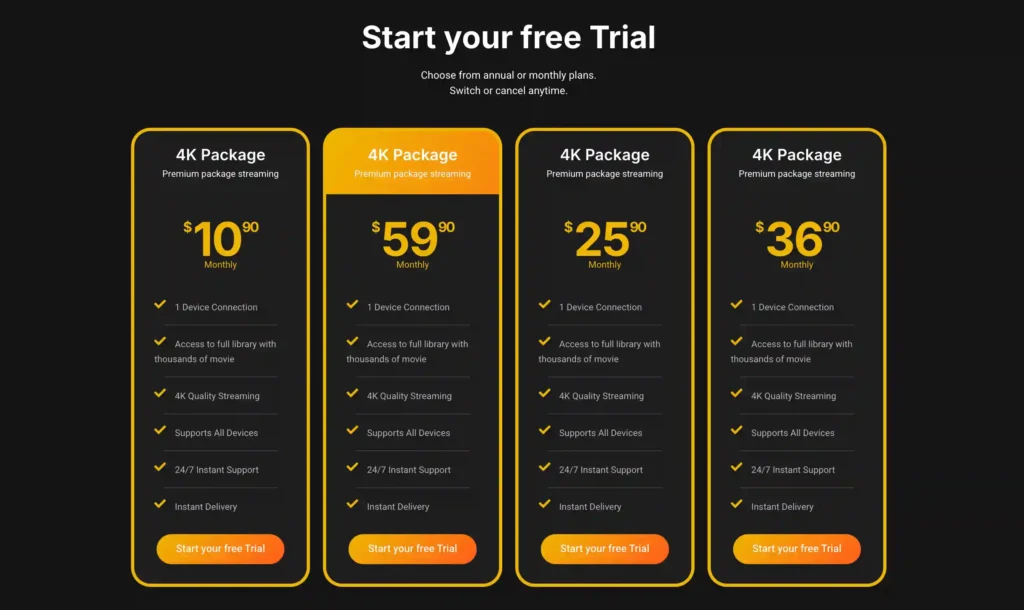
A free trial is available for eligible new users. Subscription prices and promotions can change, so it’s recommended to check the official official VibeCastTV website.
waipu.tv and Zattoo
Both waipu.tv and Zattoo are officially available through the Amazon Appstore on Fire TV Stick in Germany, confirmed as part of the app lineup supported even on the more restricted Vega OS devices. Both offer free tiers with a limited channel selection and paid tiers with broader access, as covered in VibeCastTV’s guide to legal IPTV options in Germany.
MagentaTV
Deutsche Telekom’s MagentaTV has an official Fire TV app, supported on Fire TV devices running Fire TV OS 6 or later. According to Telekom’s own site, the app works over any internet connection — you don’t need an existing Telekom contract or a satellite/cable subscription to use it, though a MagentaTV subscription is still required for full access.
Public Broadcasters: ARD, ZDF, Arte
Germany’s public broadcasters ARD, ZDF, and the Franco-German channel Arte all have official apps confirmed as available on Fire TV Stick, including on the newer, more restricted Vega OS devices, giving free access to a substantial base of live and on-demand German content without any subscription.
Fire TV Stick Compatibility Table
| Device | Operating system | Sideloading supported | Official German streaming apps available | Important limitation | Date checked |
|---|---|---|---|---|---|
| Fire TV Stick 4K Max | Fire OS | Yes | Yes (waipu.tv, Zattoo, MagentaTV, ARD, ZDF, etc.) | Sideloaded apps may be flagged by Amazon’s piracy blacklist if applicable | 2026-08-30 |
| Fire TV Stick 4K Plus | Fire OS | Yes | Yes | Same blacklist policy applies | 2026-08-30 |
| Fire TV Stick 4K (2023 or earlier) | Fire OS | Yes | Yes | Older hardware, same blacklist policy applies | 2026-08-30 |
| Fire TV Stick 4K Select | Vega OS | No (consumer sideloading blocked) | Yes, via Amazon Appstore only | No Downloader/APK installs | 2026-08-30 |
| Fire TV Stick HD (2026) | Vega OS | No | Yes, via Amazon Appstore only | No custom launchers either | 2026-08-30 |
Prices, features, and availability were checked on August 30, 2026, and may change.
How to Verify Any IPTV App Before Installing
Whether an app comes from the Amazon Appstore or is sideloaded on a Fire OS device, check the following before entering any login details:
- Is the app listed in the Amazon Appstore, or does it require sideloading from an unfamiliar source?
- Does the company behind the app have a verifiable name, address, and support contact?
- Is the pricing realistic for the content offered, or does it promise extensive premium channels for an implausibly low price?
- Could the app fall under the type of unauthorized-access software Amazon has stated it is now blacklisting?
The provider’s content-licensing arrangements could not be independently verified from publicly available information for any app not distributed through the Amazon Appstore or confirmed as an official broadcaster’s own application. Enter only account information or playlist details supplied by a provider you are authorized to use. VibeCastTV does not provide playlists, server access, portal URLs, or television credentials.
Troubleshooting Common Fire TV Stick Streaming Issues
| Issue | Likely cause category | What to check first |
|---|---|---|
| App suddenly shows a warning or stops working | Application issue | This may be related to Amazon’s piracy-app blacklist rollout; confirm the app’s legitimacy and official source |
| Can’t sideload any app on a new Fire Stick | Device issue | Check whether your device runs Vega OS under Settings → My Fire TV → About |
| waipu.tv or Zattoo won’t log in | Account issue | Verify your subscription status and credentials directly on the provider’s own site |
| Buffering during playback | Home-network issue | Check Wi-Fi signal strength or switch to Ethernet if available |
| MagentaTV app missing content | Provider-side/subscription issue | Confirm your MagentaTV subscription tier includes the content you’re trying to access |
Limitations of This Guide
Amazon’s Vega OS rollout and piracy-app blacklisting policy are both recent and may expand in scope; always check your specific Fire Stick model’s current specifications and any in-app warnings before assuming a given app will keep working. This article is based on official documentation, publicly available policies, and independent editorial research rather than hands-on testing.
FAQs
Can I still sideload apps on my Fire TV Stick in Germany in 2026?
It depends on your model. Fire OS devices (4K Max, 4K Plus, older generations) still support sideloading. Vega OS devices (4K Select, HD 2026) do not.
Is sideloading illegal in Germany?
Sideloading itself is not illegal — it’s a standard device capability. Using a sideloaded app to access unauthorized copyrighted content is a separate issue that can carry legal risk under German copyright law (UrhG).
Why did my sideloaded app suddenly show a warning or stop working?
Amazon began blacklisting specific piracy-focused apps across Fire TV software starting in October 2025, in a phased rollout that first warns users, then fully blocks the flagged app.
What legal apps can I use to watch German TV on a Fire TV Stick?
waipu.tv, Zattoo, MagentaTV, ARD, ZDF, and Arte are all officially available through the Amazon Appstore in Germany, including on the newer, more restricted Vega OS devices.
Does Vega OS make my Fire TV Stick more secure?
Amazon has stated that restricting installations to its own Appstore reduces malware risk from third-party app sources, which is the company’s stated rationale for both the Vega OS restriction and the separate piracy-app blacklist.
Do I need a VPN to use IPTV apps on my Fire TV Stick in Germany?
No. A VPN does not make unauthorized streaming legal and may violate a streaming platform’s terms when used to bypass geographic restrictions. Official apps like waipu.tv, Zattoo, and MagentaTV don’t require a VPN to function.
Conclusion
Most “best IPTV Fire TV Stick Germany” searches are already answered by apps built directly into the platform: waipu.tv, Zattoo, MagentaTV, and Germany’s public broadcasters all run officially, with no sideloading required, even on the newer, more restricted Vega OS devices. Where sideloading is still technically possible on older Fire OS sticks, it’s worth knowing that Amazon is now actively watching for and blocking apps built around unauthorized access, separate from the hardware-level restriction on newer devices.
Copyright and lawful-use notice: This article is intended for general education and lawful troubleshooting. VibeCastTV does not sell IPTV subscriptions, host television channels, provide streaming credentials, distribute playlists, or encourage copyright infringement. Readers should use only services and content they are authorized to access. Provider licensing, platform availability, and streaming rights vary by country and may change over time.








One Response