
By KAVANI | Fact-checked: August 30, 2026
Direct answer: LG Smart TVs run webOS, which restricts app installation to the LG Content Store by default. In France, LG Channels, Molotov, and myCanal are officially supported apps that cover a broad range of free and subscription TV without any workaround. Apps missing from the Content Store, like IPTV Smarters Pro, require LG’s official but time-limited developer mode rather than a simple APK install.
Table of Contents
How LG Smart TVs Handle Apps: The webOS App Model
LG Smart TVs run webOS, LG’s own operating system, which is not Android. That distinction shapes everything about how IPTV apps work on these TVs. webOS apps are packaged in a format called .ipk, and the LG Content Store only distributes apps that developers have specifically built and certified for webOS. There’s no APK sideloading like on an Android TV box, and there’s no equivalent of installing an app “the same way” you would on a phone.
This is a common source of confusion in search results, since many guides mix up webOS (LG) and Tizen (Samsung) instructions, or apply Android sideloading steps that simply don’t work on either platform.
Official Streaming and IPTV-Adjacent Apps for LG Smart TVs in France
LG Smart TVs Channels
LG Channels is built directly into webOS and is included free on every LG Smart TV, according to LG’s own French site. It’s an ad-supported service offering live and on-demand channels, accessible by pressing the LG Channels button on the remote or finding its icon (marked “CH”) on the home screen. LG states the service is available in 33 countries, including France.
The exact number of channels available in France varies depending on the source — LG’s own materials describe “hundreds” of channels without a precise figure, while some independent trackers cite figures around 100 to 180-plus.
VibeCastTV could not independently verify an exact current channel count and recommends checking the LG Channels guide within your TV for the current lineup. In 2025, LG added channels from the RMC BFM group to the French lineup.
VibeCastTV : Best IPTV LG Smart TVs France 2026
VibeCastTV is an IPTV subscription service designed for users who want to stream live television and on-demand entertainment across multiple devices. The platform focuses on providing an easy setup experience, flexible subscription plans, and compatibility with many popular IPTV applications.
Whether you’re looking for news, entertainment, sports programming, or international channels, VibeCastTV aims to offer a convenient streaming solution for users in the USA, Canada, and other supported regions.
Key Features
📺 Live Television
VibeCastTV provides access to a wide range of live television categories, including entertainment, news, lifestyle, children’s programming, and international content.
🎬 Video on Demand
Subscribers can browse a library of on-demand content, with new titles added periodically depending on availability.
🖥️ Multi-Device Compatibility
The service is compatible with many popular IPTV devices and applications, including:
- Amazon Fire TV & Fire Stick
- Android TV
- Android smartphones and tablets
- iPhone & iPad
- Windows PCs
- Mac computers
- Smart TVs
- IPTV Smarters
- TiviMate
- XCIPTV
- Other apps that support M3U playlists or Xtream Codes API
📡 Streaming Quality
Where supported by the source and internet connection, streams may be available in:
- HD
- Full HD (1080p)
- 4K Ultra HD
Actual quality may vary depending on content availability, device capabilities, and network performance.
⚡ Quick Setup
New customers receive setup information after subscribing, making it possible to start using the service in a short amount of time.
💬 Customer Support
VibeCastTV provides customer assistance for account setup, installation, and general service questions.
Services
Depending on the subscription plan, VibeCastTV may include access to:
- Live TV
- Entertainment channels
- News channels
- Sports programming
- Kids’ content
- International channels
- Video-on-Demand (VOD)
- Electronic Program Guide (where supported)
- Multi-device compatibility
- Setup assistance
Available content may vary over time.
Pricing
VibeCastTV offers several subscription lengths, allowing users to choose the option that best fits their needs.
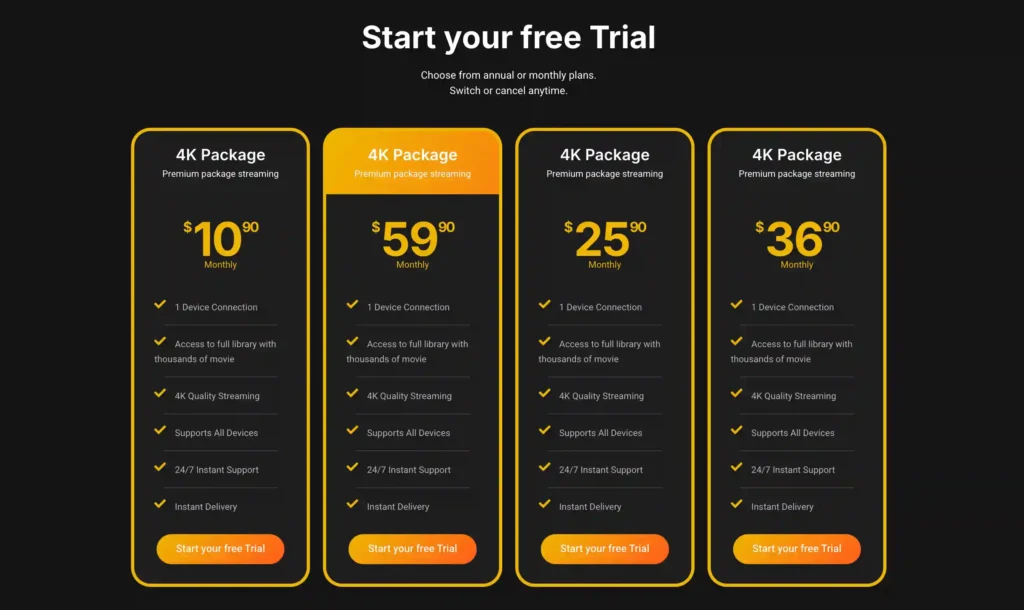
A free trial is available for eligible new users. Subscription prices and promotions can change, so it’s recommended to check the official official VibeCastTV website.
Molotov
Molotov has been available on LG Smart TVs since webOS 2.0/3.0 models, according to Molotov’s own help documentation. In mid-2025, Molotov and LG announced a deeper partnership that goes beyond simple Content Store availability:
Molotov content now appears directly on the home screen of LG TVs running webOS 3.0 or later, rather than requiring users to open the app separately first. To install it manually, search “Molotov TV” in the LG Content Store, install it, and sign in with your existing account or create a free one.
myCanal
Canal+’s official app, myCanal, became available on LG webOS TVs starting with webOS 4.0 models (roughly the 2018 range), according to independent reporting at the time of its launch. As with any subscription app, full content access requires an active Canal+ subscription.
Why Some IPTV Apps Aren’t in the LG Smart TVs Content Store
LG Smart TVs Official Developer Mode: How It Actually Works
Some general-purpose IPTV players, including IPTV Smarters Pro, do not have a certified webOS version listed in the LG Content Store — a gap confirmed both by independent guides and by users reporting the same issue on LG’s own community forum. The only way LG officially supports installing such an app is through LG’s Developer Mode, which is different from a generic “unknown sources” toggle.
To use it, you create a free account at LG’s developer site, enable Developer Mode on the TV itself (either through Settings or a dedicated “Developer Mode” app depending on your webOS version), and sign in with that developer account. From there, installing an app requires connecting a computer running LG’s official command-line tools and pushing the properly packaged .ipk file to the TV.
According to independent technical guides, LG’s developer mode automatically disables itself roughly 50 hours after activation, which also removes any app installed that way — meaning it isn’t designed as a permanent installation method.
What Developer Mode Does Not Do
Developer Mode does not turn your TV into an open Android-style device, and it does not grant root access, according to LG’s own developer documentation as referenced in user reports. It also doesn’t verify the safety or legitimacy of whatever app you choose to sideload through it — that responsibility stays with you. Whether using developer mode affects your TV’s warranty is a question best confirmed directly with LG support for your specific model and region, since public guidance on this point is inconsistent.
LG Smart TVs webOS Compatibility by Model Year
| LG Smart TVs generation | webOS version | Native app support | Developer mode sideloading |
|---|---|---|---|
| 2014–2017 models | webOS 1.0–3.5 | Limited; older apps only, few updates | Available but time-limited (~50 hrs) |
| 2018–2020 models | webOS 4.0–5.0 | LG Channels, Molotov, myCanal typically present | Available |
| 2021–2026 models | webOS 6.0–24 | Full current app catalog, including deeper Molotov integration | Available |
Prices, features, and availability were checked on August 30, 2026, and may change.
How to Verify Any IPTV App Before Entering Credentials
Whether an app comes from the LG Content Store or through developer-mode sideloading, apply the same checks before entering any login details:
- Is the app officially certified and listed in the LG Content Store, or does it require developer mode to install?
- Does the company behind the app have a verifiable name, address, and support contact?
- Is the pricing realistic for the content on offer, or does it promise extensive premium channels for an implausibly low price?
- Does the provider avoid requiring you to keep developer mode permanently active?
The provider’s content-licensing arrangements could not be independently verified from publicly available information for any app not distributed through the LG Content Store or a named broadcaster’s own channel. Enter only account information or playlist details supplied by a provider you are authorized to use. VibeCastTV does not provide playlists, server access, portal URLs, or television credentials.
Troubleshooting Common LG TV Streaming Issues
| Issue | Likely cause category | What to check first |
|---|---|---|
| App missing from LG Content Store search | Application availability issue | Confirm your webOS version under Settings → General → About; older versions may lack newer apps |
| Molotov or myCanal won’t log in | Account issue | Verify your subscription status and credentials directly on the provider’s own site |
| Developer-mode app disappears after a couple of days | Device issue | This is expected; LG’s developer mode auto-disables after roughly 50 hours |
| Buffering during playback | Home-network issue | Check Wi-Fi signal strength or switch to an Ethernet connection |
| App installed but shows no content | Provider-side issue | Confirm the app’s own servers or your subscription are active before assuming a device fault |
Limitations of This Guide
App and channel availability on LG webOS varies by TV model, region, and software version, and can change without notice. Public information about how LG’s developer mode affects warranty coverage is inconsistent across sources; confirm current policy directly with LG for your specific TV. This article is based on official documentation, publicly available policies, and independent editorial research rather than hands-on testing on a specific LG TV model.
FAQs
Is LG Channels really free in France?
Yes, LG Channels is an ad-supported service built into webOS and included at no cost on LG Smart TVs, according to LG’s own French site.
Can I install any IPTV app on my LG Smart TV?
Only apps certified for webOS and listed in the LG Content Store install through LG’s normal process. Apps like IPTV Smarters Pro, which lack a certified webOS version, require LG’s official developer mode instead.
Is LG Smart TVs developer mode the same as Samsung’s?
No. LG’s developer mode requires a free LG developer account and uses command-line tools to push .ipk files, and it auto-disables after about 50 hours. Samsung’s Tizen developer mode works differently and has its own separate risk profile.
Does using developer mode void my LG TV’s warranty?
Public guidance on this is inconsistent, and VibeCastTV could not independently confirm a definitive answer. Check directly with LG support for your specific model and region before proceeding.
Why isn’t IPTV Smarters Pro in the LG Content Store?
Its developers have not published a certified webOS version through LG’s official app certification process, based on independent reporting and user reports on LG’s own community forum.
Do I need a VPN to use IPTV apps on my LG TV in France?
No. A VPN does not make unauthorized streaming legal and may violate a streaming platform’s terms when used to bypass geographic restrictions. Official apps like LG Channels, Molotov, and myCanal don’t require a VPN to function.
Conclusion
Most of what people search for under “best IPTV LG France” is already covered natively through LG Channels, Molotov, and myCanal, all built for webOS without any workaround. Where an app is genuinely missing from the LG Content Store, LG’s own developer mode is the only officially supported path — a deliberately time-limited, account-gated process rather than an open door for sideloading anything.
Copyright and lawful-use notice: This article is intended for general education and lawful troubleshooting. VibeCastTV does not sell IPTV subscriptions, host television channels, provide streaming credentials, distribute playlists, or encourage copyright infringement. Readers should use only services and content they are authorized to access. Provider licensing, platform availability, and streaming rights vary by country and may change over time.







