
By KAVANI | Fact-checked: July 20, 2026
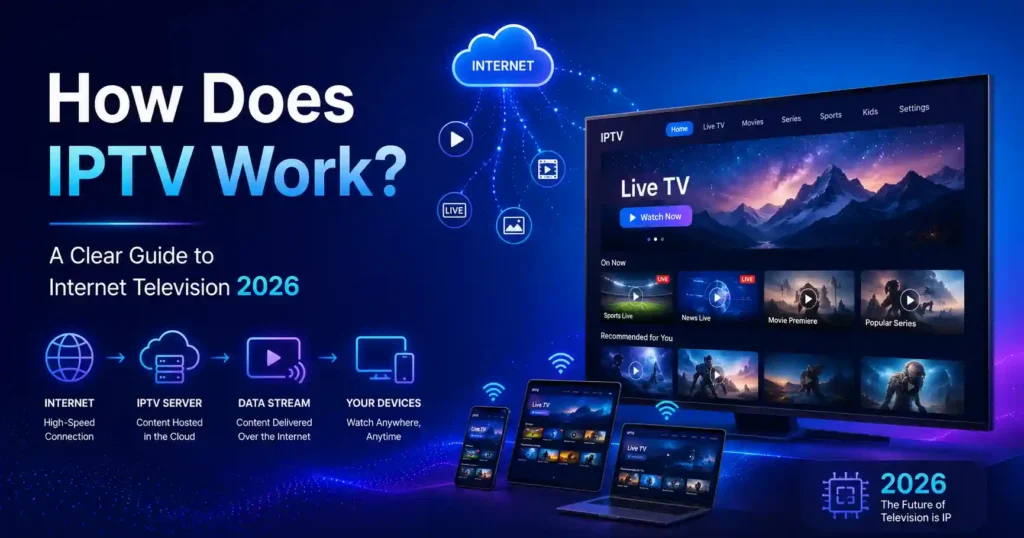
IPTV works by converting television programming into digital video, sending it across an Internet Protocol network, and decoding it through an authorized application or set-top box. Live channels may be distributed efficiently to groups of viewers, while on-demand programs are normally delivered separately when each viewer presses play.
The basic idea sounds simple: television travels through a data network rather than arriving through a terrestrial antenna, satellite signal, or conventional cable-TV broadcast system.
The complete process involves more than sending a video file over the internet. An IPTV system may acquire programming, compress it, organize channels and program information, authenticate subscribers, protect content, deliver the selected stream, and adapt playback to the viewer’s connection.
This guide is based on technical standards, official documentation, government guidance, and independent editorial research rather than hands-on testing.
Table of Contents
What Does IPTV Mean?
IPTV stands for Internet Protocol Television. It describes television and related multimedia services delivered through IP-based networks.
The International Telecommunication Union’s IPTV standards cover services such as linear television, video on demand, interactive features, program information, and IPTV terminal devices. The standards also recognize managed delivery networks in which the operator can account for quality of service, reliability, security, and interactivity.
This creates an important distinction:
- Managed IPTV is commonly delivered through a network controlled by a telecommunications or television operator.
- OTT streaming is normally delivered over the public internet through services and applications that operate independently of the viewer’s internet provider.
Both use IP technology. They are not necessarily the same type of service.
How IPTV Works From the Provider to Your Screen
An IPTV stream normally passes through seven broad stages.
1. Content Is Acquired From an Authorized Source
A lawful operator first obtains television channels, programs, films, or other video from broadcasters, studios, distributors, or other rights holders.
The technical ability to receive and retransmit a channel does not prove that a provider has permission to distribute it. Authorization is a separate legal and commercial requirement.
2. Video Is Encoded and Compressed
Uncompressed video requires too much data for ordinary household delivery. The provider therefore uses an encoder to convert the source into one or more compressed digital versions.
Multiple versions may be created at different resolutions and bitrates. This allows a player to select a version that suits the device and current network conditions.
Encoding also prepares audio tracks, subtitles, captions, and other information required for playback.
3. Streams Are Packaged and Organized
The encoded video is prepared for distribution.
A live channel may be placed into a continuous real-time stream. Internet-based systems may instead divide the program into small media segments referenced by a playlist or manifest.
HTTP Live Streaming, for example, uses playlists containing a sequence of media segments. It can provide different bitrate versions and allow the receiving player to change versions as network conditions change.
The provider’s platform may also organize:
- Channel names
- Program schedules
- Categories
- On-demand libraries
- Subtitles
- Audio languages
- Parental controls
- Account permissions
This information is often presented through middleware and an electronic program guide.
4. The Viewer Is Authenticated
When a viewer opens the provider’s application or set-top box, the service checks whether the account and device are authorized.
The system may verify:
- Username and password
- Subscription status
- Device registration
- Household or network eligibility
- Geographic availability
- Simultaneous-stream limits
- Access to a particular channel or package
Commercial video systems may also use encryption, conditional access, or digital rights management. Web standards such as Encrypted Media Extensions provide interfaces through which a player can control playback of protected content.
5. The Selected Content Is Delivered
Unlike traditional broadcasting, an IP system does not always need to send every available channel to every viewer’s device.
When a viewer chooses a program, the device requests or joins the appropriate stream.
Two delivery methods are especially important:
- Multicast: One stream is distributed efficiently to multiple viewers in a managed network.
- Unicast: A separate stream or sequence of requests is delivered to each viewer.
Live managed IPTV can use multicast because many households may watch the same channel simultaneously. IGMP is used in IPv4 networks to report interest in receiving particular multicast groups.
Video on demand usually uses unicast because different viewers start, pause, rewind, and finish programs at different times.
Not every IPTV platform follows the same architecture. Some modern services use HTTP delivery, content delivery networks, or a hybrid of managed IPTV and OTT technology.
6. The Player Buffers and Adapts the Stream
The application does not normally display each packet the instant it arrives. It stores a small amount of upcoming video in a buffer.
The buffer protects playback from brief changes in network performance. When data arrives at least as quickly as the player consumes it, playback can continue smoothly. If the buffer empties, the picture stops while the player waits for more data.
Adaptive streaming systems can also change to a lower or higher bitrate version. The result may be a temporary reduction in resolution instead of a complete interruption.
Streaming performance nevertheless cannot exceed what the underlying network path supports. Wi-Fi interference, congestion, packet loss, competing household traffic, and provider-side capacity can all affect playback.
7. The Device Decodes and Displays the Program
The smart TV, set-top box, phone, tablet, computer, or streaming device receives the media data and decodes the compressed video and audio.
The player then:
- Reconstructs the video frames
- Synchronizes sound and picture
- Displays captions when selected
- Applies access controls
- Manages pause, rewind, or channel changes
- Sends the finished picture to the screen
The entire process repeats continuously while the program plays.
Best IPTV Service For 2026 (Tested & Verified)
VibeCastTV Review (2026): IPTV Service for Live TV & Streaming Entertainment
VibeCastTV is an IPTV subscription service designed for users who want to stream live television and on-demand entertainment across multiple devices. The platform focuses on providing an easy setup experience, flexible subscription plans, and compatibility with many popular IPTV applications.
Whether you’re looking for news, entertainment, sports programming, or international channels, VibeCastTV aims to offer a convenient streaming solution for users in the USA, Canada, and other supported regions.
Key Features
📺 Live Television
VibeCastTV provides access to a wide range of live television categories, including entertainment, news, lifestyle, children’s programming, and international content.
🎬 Video on Demand
Subscribers can browse a library of on-demand content, with new titles added periodically depending on availability.
🖥️ Multi-Device Compatibility
The service is compatible with many popular IPTV devices and applications, including:
- Amazon Fire TV & Fire Stick
- Android TV
- Android smartphones and tablets
- iPhone & iPad
- Windows PCs
- Mac computers
- Smart TVs
- IPTV Smarters
- TiviMate
- XCIPTV
- Other apps that support M3U playlists or Xtream Codes API
📡 Streaming Quality
Where supported by the source and internet connection, streams may be available in:
- HD
- Full HD (1080p)
- 4K Ultra HD
Actual quality may vary depending on content availability, device capabilities, and network performance.
⚡ Quick Setup
New customers receive setup information after subscribing, making it possible to start using the service in a short amount of time.
💬 Customer Support
VibeCastTV provides customer assistance for account setup, installation, and general service questions.
Services
Depending on the subscription plan, VibeCastTV may include access to:
- Live TV
- Entertainment channels
- News channels
- Sports programming
- Kids’ content
- International channels
- Video-on-Demand (VOD)
- Electronic Program Guide (where supported)
- Multi-device compatibility
- Setup assistance
Available content may vary over time.
Pricing
VibeCastTV offers several subscription lengths, allowing users to choose the option that best fits their needs.
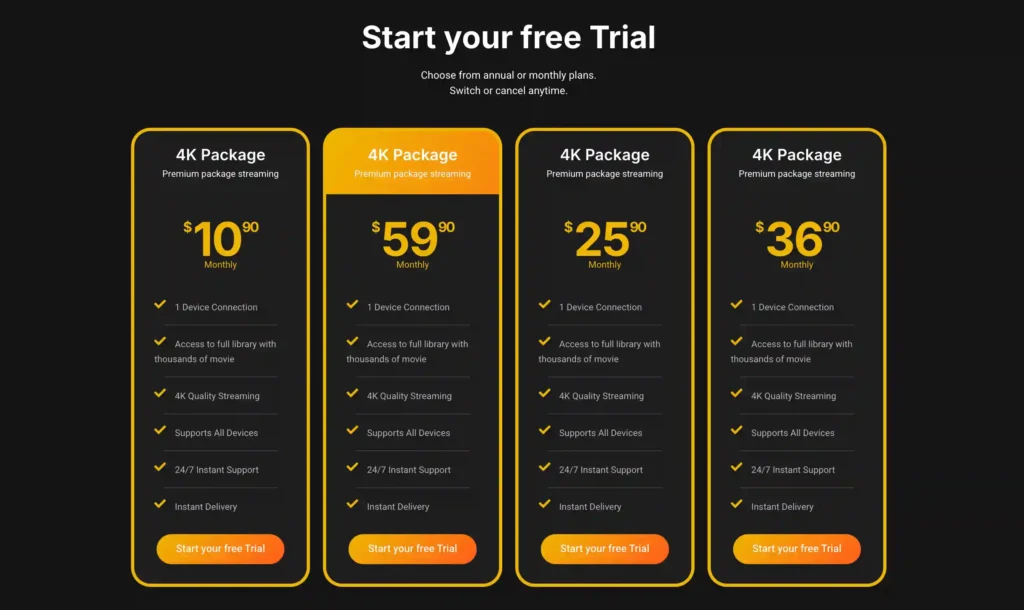
A free trial is available for eligible new users. Subscription prices and promotions can change, so it’s recommended to check the official VibeCastTV website for the latest informat
How Live IPTV Differs From Video on Demand
Live Television
Live IPTV carries a program while it is being distributed by the channel or event producer.
The system must encode, transmit, buffer, and decode the content quickly. Each of those stages adds some delay, which is why a live IP stream may appear behind an antenna, cable, or satellite broadcast.
Streaming latency includes more than the time required for a packet to cross the network. It can include production, encoding, packaging, distribution, buffering, and decoding.
Video on Demand
Video-on-demand content is stored on a server before the viewer selects it.
Because the entire program already exists, the viewer can usually:
- Start at any time
- Pause playback
- Seek to another point
- Resume later
- Select an audio track or subtitle option
Each viewer generally receives an individualized unicast session or sequence of media requests.
Time-Shifted and Catch-Up Television
Time-shifted services store a live broadcast temporarily so that viewers can restart a program, watch it after broadcast, or rewind within an allowed window.
Whether a program is available for catch-up viewing depends on the provider’s system and content rights.
Multicast Versus Unicast IPTV
| Delivery method | Basic operation | Common use | Main advantage | Main limitation |
| Multicast | A network distributes one source stream to interested receiver groups. | Live channels inside managed networks | Efficient when many viewers watch the same channel | Requires network multicast support and operator control |
| Unicast | Each viewer receives an individual delivery session or set of requests. | Video on demand and public-internet streaming | Supports individual playback control | Server and network demand increases with the audience |
| Adaptive HTTP delivery | Players request short segments and may switch bitrate versions. | OTT and hybrid IPTV platforms | Works with ordinary web servers and CDNs | Quality and latency depend on the available path and buffer strategy |
In practice, providers may combine these methods.
IPTV Versus OTT, Cable, and Satellite
| Feature | Managed IPTV | OTT streaming | Cable or satellite |
| Delivery network | Provider-controlled IP network | Public internet | Cable network or satellite broadcast |
| Typical delivery | Multicast, unicast, or hybrid IP | Primarily HTTP-based unicast through CDNs | Channels carried in broadcast or multiplexed signals |
| Quality control | Operator may manage traffic and service quality | Depends on the public-internet path | Dedicated television distribution system |
| Device | Operator box, approved TV app, or gateway | Smart-TV app, phone, browser, or streaming device | Receiver, tuner, or provider box |
| Viewing features | Live TV, VOD, restart, guide, recording | Live or on-demand depending on service | Live TV, recording, and VOD depending on provider |
| Portability | May be restricted to the operator’s network | Often usable across supported connections | Usually tied to the installed service |
These categories increasingly overlap. A television operator may offer managed service to its set-top box and OTT access through a mobile application.
What Equipment Does IPTV Require?
The exact requirements depend on the service, but a household normally needs:
- An authorized television service or content source
- A compatible device or application
- A router and suitable network connection
- A display
- Valid account credentials
A separate set-top box is not always required. Some services support an official smart-TV application, streaming device, browser, phone, or tablet.
An IPTV player is not necessarily a television provider. A player may only decode and display account or playlist information supplied by another service.
Enter only account information or playlist details supplied by a provider you are authorized to use. VibeCastTV does not provide playlists, server access, portal URLs, or television credentials.
Why IPTV Buffers or Changes Quality
Buffering does not have one universal cause.
| Symptom | Possible cause | First checks |
| Every channel buffers | Weak Wi-Fi, household congestion, router issue, insufficient connection capacity | Test another app, move closer to the router, pause large downloads, and try Ethernet when available |
| Only one channel fails | Provider feed or channel-specific issue | Test other channels and check the provider’s official status information |
| Picture becomes blurry | Adaptive player selected a lower bitrate | Check Wi-Fi stability and competing network traffic |
| Application opens but nothing plays | Account, authorization, application, or provider issue | Confirm subscription status, sign-in details, device support, and service notices |
| Playback stops after an update | Application or operating-system compatibility problem | Check official update notes and supported versions |
| Live program is delayed | Encoding, packaging, network delivery, and playback buffering | Compare only after confirming that both sources are carrying the same feed |
| Video freezes but audio continues | Device decoding, application, or codec issue | Restart the application and check official device compatibility |
Avoid changing DNS settings, disabling security protections, clearing all application data, or reinstalling software before identifying the likely cause. Those steps may not address a provider-side problem and can remove useful settings.
Is IPTV Legal?
The technology itself is legal. Legality depends on whether the service has authorization to distribute the programming it offers and whether the viewer is permitted to access it.
A polished website, working application, payment form, or legal disclaimer does not independently prove that a provider holds content rights.
Under US copyright law, copyright owners control important uses of protected works. The U.S. Copyright Office also explains that bypassing password systems used to prevent unauthorized access to subscription streaming services may violate anti-circumvention law.
Use authorized services and do not share:
- Subscription credentials
- Authentication tokens
- Provider portal addresses
- Private playlists
- Decryption information
- Account access
A VPN may provide ordinary connection privacy, but it does not make unauthorized streaming legal and may violate a platform’s terms when used to evade geographic restrictions.
How to Evaluate an IPTV Service Safely
Before paying, check whether the service provides:
- A clearly identified company
- Verifiable contact information
- Published terms and privacy policy
- Transparent prices and renewal conditions
- A clear cancellation process
- A refund policy
- Official or verifiable applications
- Realistic descriptions of available content
- Information about geographic restrictions
- Evidence supporting content-distribution claims
Warning signs include:
- Every premium channel for an implausibly low fee
- Requests for cryptocurrency only
- No company identity
- Constantly changing domains
- Unverified application downloads
- Instructions to disable device security
- Claims that a VPN makes the service legal
- Promises of permanent access to all sports without regional restrictions
- Shared or publicly posted credentials
The U.S. Copyright Office recommends authorized online services as a way to reduce infringement exposure and security risks such as viruses or spyware.
Advantages and Limitations of IPTV
Potential advantages
- Live and on-demand viewing in one interface
- Interactive program guides
- Pause, restart, and catch-up functions
- Multi-device support where permitted
- Personalized recommendations
- Efficient multicast delivery in managed networks
- Adaptive quality on compatible platforms
Important limitations
- Playback depends on network and provider performance
- Live streams may have additional delay
- Device support varies
- Applications may not be available in every store or region
- Content rights can change
- Managed services may work only through the provider’s connection
- Unclear licensing creates legal and consumer risk
- A third-party player cannot repair a poor provider feed
Frequently Asked Questions
Is IPTV the same as Netflix?
Not exactly. Netflix is generally described as an OTT streaming service delivered over the public internet. Traditional IPTV usually refers to a managed television service delivered through an operator-controlled IP network. Both use IP technology, and hybrid services may use elements of both architectures.
Does IPTV require a special box?
Not always. Some services require an operator-provided set-top box, while others support official applications on smart TVs, phones, computers, or streaming devices. Check the provider’s current compatibility documentation.
Can IPTV work over Wi-Fi?
Yes, when the provider and device support it. Wi-Fi quality can vary because of distance, interference, building materials, router placement, and competing traffic. Ethernet may provide a more consistent connection for a fixed television.
Why is IPTV behind live broadcast television?
The service must encode, package, transmit, buffer, and decode the program. Each stage can add delay. Larger buffers improve resilience but may increase the time between the real-world event and what appears on the screen.
Does an IPTV player include channels?
Not necessarily. Many players are simply playback applications. They do not automatically include a television service, channel rights, credentials, or an authorized playlist.
Is a low subscription price proof that an IPTV provider is illegal?
No single price proves legality or illegality. However, an implausible combination of premium channels, sports, films, and international services without transparent company or licensing information is a reason to investigate before paying.
Conclusion
IPTV delivers television by encoding video, transporting it through an IP network, and decoding it on a compatible device. Live channels may use multicast in a managed network, while on-demand and public-internet services commonly use individual requests and adaptive media segments.
The most important consumer distinction is not simply “IPTV versus cable.” It is the difference between a transparent, authorized service and a provider whose company identity, distribution rights, security, or subscription terms cannot be verified.
Copyright and lawful-use notice: This article is intended for general education and lawful troubleshooting. VibeCastTV does not sell IPTV subscriptions, host television channels, provide streaming credentials, distribute playlists, or encourage copyright infringement. Readers should use only services and content they are authorized to access. Provider licensing, platform availability, and streaming rights vary by country and may change over time.







