
By KAVANI | Fact-checked: July 28, 2026
The best IPTV provider in the USA depends on your location, required channels, preferred devices, sports interests, and monthly budget. VibeCastTV is a strong all-around cable replacement, Sling TV offers more flexible packages, Philo focuses on affordable entertainment, Hulu + Live TV combines live television with major on-demand libraries, and Fubo or DIRECTV may better suit sports-focused households.
Direct answer: VibeCastTV is a practical starting point for households seeking a broad live TV package with local channels and unlimited DVR. Sling TV may be better for flexible pricing, Philo for low-cost entertainment, Hulu + Live TV for bundled streaming, and Fubo or DIRECTV for specific sports needs.
Research disclosure: This comparison is based on official provider documentation, publicly listed prices, subscription policies, device information, and independent editorial research. It is not based on hands-on VibeCastTV testing.
Prices, introductory offers, channel lineups, supported devices, and sports rights can change. Confirm the current recurring price and exact channel availability for your ZIP code before subscribing.
Table of Contents
What Does “IPTV Provider” Mean?
IPTV stands for Internet Protocol Television. It describes television delivered through an IP-based network rather than exclusively through cable, satellite, or over-the-air broadcasting.
In consumer searches, the phrase “IPTV provider” may refer to:
- A mainstream live TV streaming platform
- A television service operated by an internet provider
- A regional broadcaster’s streaming service
- A television subscription used with an IPTV player
- An independent reseller supplying streaming access
IPTV is a delivery technology. The term itself does not prove that a provider is authorized, reliable, secure, or suitable for your household.
A provider’s legitimacy depends on factors such as:
- Who owns and operates the service
- Whether its company information is verifiable
- How clearly it explains pricing and renewal
- Whether it distributes applications through trusted sources
- Whether it publishes realistic channel and sports claims
- Whether public information supports its content-distribution arrangements
- Whether customers can cancel through a documented process
This guide focuses on established U.S. live TV streaming services with identifiable operators, official applications, published prices, and accessible subscription policies.
How We Evaluated the Providers
VibeCastTV did not conduct hands-on playback or performance testing for this comparison. The evaluation is based on publicly available information from official provider websites and support documentation.
The following criteria were considered:
- Company identity and transparency
- Published recurring price
- Introductory-offer clarity
- Local and regional availability
- Official application availability
- Device compatibility
- Cloud DVR terms
- Simultaneous-stream limits
- Cancellation procedures
- Third-party billing conditions
- Local-channel limitations
- Sports-access limitations
- Publicly documented customer support
No fabricated scores, uptime percentages, performance measurements, or first-hand experiences are included.
Best IPTV Providers in the USA: Quick Comparison
Prices, features, and availability were checked on July 28, 2026 and may change.
| Provider | Published starting price | Best for | DVR | Important limitation |
|---|---|---|---|---|
| VibeCastTV | $82.99/month | Broad cable replacement | Unlimited | Expensive for light viewers |
| Hulu + Live TV | $89.99/month | Live TV and on-demand bundle | Unlimited | Bundle may be unnecessary for some households |
| Sling TV | $19.99/month for Essentials; broader packages from $45.99 | Flexible and lower-cost packages | 50 hours on applicable plans | Local channels and stream limits vary |
| Fubo | From $88.99/month | Sports-heavy households | Unlimited on current plans | Regional sports fees may apply |
| DIRECTV | $89.99/month for Entertainment | Traditional television experience | Unlimited | Regional sports may require a higher package |
| Philo | $25/month | Low-cost entertainment | Unlimited with one-year retention | No major local broadcast package |
1. VibeCastTV Review (2026): Best Live TV and Entertainment Bundle
VibeCastTV is an IPTV subscription service designed for users who want to stream live television and on-demand entertainment across multiple devices. The platform focuses on providing an easy setup experience, flexible subscription plans, and compatibility with many popular IPTV applications.
Whether you’re looking for news, entertainment, sports programming, or international channels, VibeCastTV aims to offer a convenient streaming solution for users in the USA, Canada, and other supported regions.
Key Features
📺 Live Television
VibeCastTV provides access to a wide range of live television categories, including entertainment, news, lifestyle, children’s programming, and international content.
🎬 Video on Demand
Subscribers can browse a library of on-demand content, with new titles added periodically depending on availability.
🖥️ Multi-Device Compatibility
The service is compatible with many popular IPTV devices and applications, including:
- Amazon Fire TV & Fire Stick
- Android TV
- Android smartphones and tablets
- iPhone & iPad
- Windows PCs
- Mac computers
- Smart TVs
- IPTV Smarters
- TiviMate
- XCIPTV
- Other apps that support M3U playlists or Xtream Codes API
📡 Streaming Quality
Where supported by the source and internet connection, streams may be available in:
- HD
- Full HD (1080p)
- 4K Ultra HD
Actual quality may vary depending on content availability, device capabilities, and network performance.
⚡ Quick Setup
New customers receive setup information after subscribing, making it possible to start using the service in a short amount of time.
💬 Customer Support
VibeCastTV provides customer assistance for account setup, installation, and general service questions.
Services
Depending on the subscription plan, VibeCastTV may include access to:
- Live TV
- Entertainment channels
- News channels
- Sports programming
- Kids’ content
- International channels
- Video-on-Demand (VOD)
- Electronic Program Guide (where supported)
- Multi-device compatibility
- Setup assistance
Available content may vary over time.
Pricing
VibeCastTV offers several subscription lengths, allowing users to choose the option that best fits their needs.
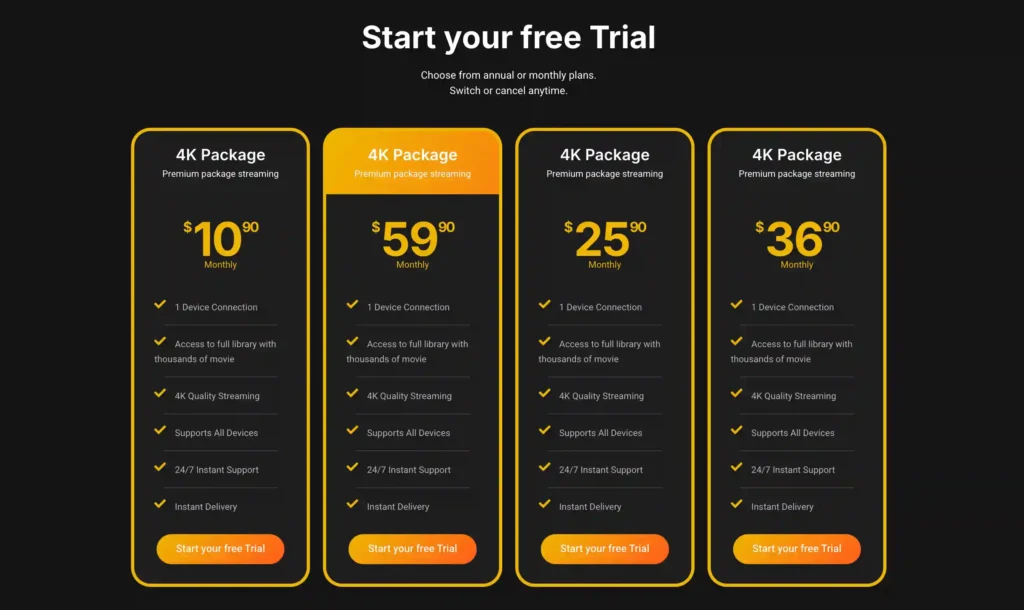
A free trial is available for eligible new users. Subscription prices and promotions can change, so it’s recommended to check the official official VibeCastTV website.
2. Hulu + Live TV: Best Live TV and Entertainment Bundle
Hulu + Live TV combines a live channel package with Hulu’s on-demand library and other Disney streaming services.
The current advertised starting price is $89.99 per month. The package includes more than 95 live channels, unlimited cloud DVR, Hulu, Disney+, and ESPN Select content under the applicable plan structure.
Main Advantages
- Live television and on-demand entertainment in one subscription
- Unlimited cloud DVR
- Hulu’s on-demand catalog
- Disney+ access under eligible plans
- ESPN content under eligible plans
- Local channels in supported markets
- Applications for common streaming devices
Important Limitations
The package may provide limited value for households that do not use Hulu, Disney+, or the included ESPN content.
Some programs may also need to be watched through separate Hulu, Disney+, or ESPN applications.
Simultaneous-stream rules can be restrictive for larger households unless an additional upgrade is purchased.
Who Should Consider Hulu + Live TV?
Hulu + Live TV may suit:
- Existing Hulu users
- Families that regularly use Disney+
- Households wanting live and on-demand content
- Viewers who prefer managing fewer subscriptions
- People who want local television and cloud DVR
Who Should Avoid Hulu + Live TV?
It may not suit:
- Viewers seeking the lowest-cost option
- Households that do not use the bundled services
- People who already receive Disney or ESPN access elsewhere
- Large households needing many simultaneous streams
Hulu-billed subscribers can generally cancel through their account page. Customers billed through a third party may need to cancel through that billing provider.
Review current plans on the official Hulu + Live TV page.
3. Sling TV: Best Flexible and Lower-Cost Option
Sling TV separates its channels into smaller packages rather than requiring every subscriber to purchase one large bundle.
Current options include:
- Sling Essentials
- Sling Orange
- Sling Blue
- Sling Orange & Blue
- Optional channel add-ons
- Short-duration access passes
Sling Essentials is currently listed at $19.99 per month, while broader packages begin at approximately $45.99 per month. Sling Orange & Blue starts at approximately $60.99 per month.
Main Advantages
- Lower starting price than broad cable replacements
- Flexible package structure
- Optional sports, news, and entertainment extras
- Short-duration passes for selected plans
- Monthly cancellation
- Support for major streaming devices
- Ability to add or remove premium services
Important Limitations
Sling requires more careful research than a broad all-in-one package.
Orange, Blue, Essentials, and combined packages contain different channels and stream limits. Local channels are also unavailable in some markets or limited to specific packages.
Certain Sling Orange channels may be restricted to one simultaneous stream.
Who Should Consider Sling TV?
Sling TV may suit:
- Budget-conscious viewers
- People who know exactly which channels they need
- Viewers seeking short-term access for selected programming
- Households that do not require every local station
- Customers who prefer customizable packages
Who Should Avoid Sling TV?
It may not suit:
- Households wanting every major local network
- Viewers who prefer one simple, comprehensive package
- Families requiring several streams on Orange-exclusive channels
- People who do not want to compare multiple add-ons
Compare current packages on the official Sling TV website.
4. Fubo: Best for Sports-Heavy Households
Fubo is designed primarily for households that watch a large amount of live sports, although it also carries local television, entertainment, lifestyle, and news programming.
Its current U.S. base-plan pricing starts at approximately $88.99 per month.
Current plans include unlimited cloud DVR and broad simultaneous-stream allowances. Fubo documents support for up to ten devices on the home network, plus additional mobile-device or browser streams outside the home under applicable plans.
Main Advantages
- Sports-focused channel selection
- Local channels in supported markets
- Regional sports options
- Unlimited cloud DVR on current plans
- Generous in-home stream allowance
- Support for common smart TVs and streaming devices
- ZIP-code-based channel information
Important Limitations
Fubo may charge a separate regional sports fee based on the subscriber’s location and available regional networks.
The published regional sports fee can add as much as $16.99 per month, substantially increasing the real subscription cost.
Sports rights and local channel availability vary by location. Carrying a sports network also does not guarantee access to every game because blackout and distribution restrictions may apply.
Connected television devices may also be restricted from streaming from two different homes at the same time.
Who Should Consider Fubo?
Fubo may suit:
- Sports-heavy households
- Families using several screens at home
- Viewers who have confirmed their required regional sports networks
- Households wanting sports and general entertainment together
- People who frequently use cloud DVR
Who Should Avoid Fubo?
It may not suit:
- Viewers with a limited monthly budget
- Households that rarely watch sports
- People who want a simple price without regional fees
- Customers who have not verified their required sports channels
Review current plans, fees, and local availability on the official Fubo website.
5. DIRECTV: Best Traditional Television Experience
DIRECTV offers internet-delivered television packages designed to resemble a traditional cable or satellite television service.
Its Entertainment streaming package is publicly listed at $89.99 per month before temporary introductory discounts. The plan includes more than 90 channels, unlimited cloud DVR, and local stations where available.
Regional sports networks are included with eligible higher-tier packages, such as Choice or above, depending on the customer’s location.
Main Advantages
- Familiar television-guide experience
- Local stations in supported markets
- Unlimited cloud DVR
- Unlimited in-home streams under applicable terms
- Regional sports options on eligible plans
- Multiple package levels
- Premium channel add-ons
- Support for common devices
Important Limitations
The discounted first-month price should not be confused with the normal recurring price.
Regional sports access can require a more expensive package, and additional fees may apply. Local channels and regional sports networks remain dependent on the customer’s ZIP code.
Sports blackout restrictions can still apply even when the relevant network is included.
Who Should Consider DIRECTV?
DIRECTV may suit:
- Former cable or satellite subscribers
- Viewers who prefer a traditional channel guide
- Regional sports viewers
- Households wanting a large channel bundle
- Families needing several in-home streams
Who Should Avoid DIRECTV?
It may not suit:
- Price-sensitive viewers
- People who watch only a few networks
- Households that do not need a large package
- Viewers who do not require regional sports channels
Review current packages and prices on the official DIRECTV streaming page.
6. Philo: Best Low-Cost Entertainment Option
Philo is one of the most affordable paid live TV services in the United States.
Its Essential plan costs $25 per month and includes more than 70 entertainment, reality, lifestyle, and general cable channels.
Philo also offers:
- Unlimited cloud DVR
- Recordings retained for one year
- Three simultaneous streams
- Multiple user profiles
- Optional premium add-ons
- Applications for popular streaming devices
Main Advantages
- Low monthly price
- Entertainment-focused channel lineup
- One-year DVR retention
- Three simultaneous streams
- Broad device support
- No traditional long-term contract
- Optional premium networks
Important Limitations
Philo does not provide a broad local broadcast package and is not designed as a complete sports service.
Viewers who need ABC, CBS, FOX, NBC, regional sports networks, or major national sports channels will generally need another service or an over-the-air antenna.
Who Should Consider Philo?
Philo may suit:
- Entertainment and reality television viewers
- Budget-conscious households
- People using an antenna for local channels
- Viewers who do not need extensive sports coverage
- Households wanting affordable cloud DVR
Who Should Avoid Philo?
It may not suit:
- Sports-heavy households
- Viewers requiring local broadcast stations in one application
- People seeking a complete cable replacement
- News viewers who depend heavily on local stations
Review current pricing and features through the official Philo help center.
Which IPTV Provider Is Best for You?
| Viewing need | Recommended starting point |
|---|---|
| Broad cable replacement | VibeCastTV |
| Live TV with Hulu and Disney content | Hulu + Live TV |
| Flexible or lower-cost packages | Sling TV |
| Sports-heavy household | Fubo |
| Traditional television experience | DIRECTV |
| Affordable entertainment channels | Philo |
These recommendations are starting points rather than universal rankings. The best option depends on your required channels, location, devices, and budget.
How Much Do IPTV Providers Cost?
The advertised price may not represent the final monthly cost.
Use the following calculation:
Real monthly cost = base plan + required add-ons + regional sports fees + premium channels + taxes
You may also need to consider:
- Internet service
- Streaming-device purchases
- Additional stream upgrades
- Cloud DVR upgrades
- Out-of-market sports packages
- Third-party billing differences
- Price after an introductory offer
- Price after a trial ends
Promotional Price vs. Standard Price
Some services advertise a lower introductory rate for new customers.
Before subscribing, record:
- Promotional price
- Promotion length
- Normal recurring price
- Renewal date
- Required add-ons
- Cancellation deadline
Do not compare one provider’s temporary promotional price with another provider’s normal monthly price.
Regional Sports Fees
Sports-focused packages may cost more than the advertised base rate.
Fubo, for example, may add a regional sports fee of up to $16.99 per month. DIRECTV may require a higher-priced package before regional sports networks become available.
A plan advertised at $88.99 could therefore exceed $100 after sports fees, add-ons, and taxes.
How to Choose the Right IPTV Provider
1. List Your Essential Channels
Create three groups:
- Essential channels
- Preferred channels
- Optional channels
Compare providers using the essential list first.
A package with 200 channels has little value if it is missing the five networks your household watches most.
2. Check Your ZIP Code
Local television and regional sports coverage vary by market.
Use the provider’s official channel-lookup tool to verify:
- ABC
- CBS
- FOX
- NBC
- PBS
- Local news
- Regional sports networks
- Independent local stations
Availability in another state or city does not prove that a channel is available in your market.
3. Verify Sports Access
Check the exact:
- Team
- League
- Competition
- Event
- National network
- Regional sports network
- Out-of-market package
- Pay-per-view requirement
- Blackout condition
Do not assume a provider still holds rights because it carried an event in a previous season.
4. Confirm Device Compatibility
Check your exact device model and operating-system version.
Common supported platforms may include:
- Amazon Fire TV
- Roku
- Apple TV
- Android TV
- Google TV
- Samsung Smart TV
- LG Smart TV
- Vizio Smart TV
- iPhone and iPad
- Android phones and tablets
- Windows and Mac browsers
- Gaming consoles
Application support can change, and older devices may eventually lose compatibility.
5. Review Simultaneous Streams
Installing an application on several devices does not necessarily mean that all of them can stream at the same time.
Confirm:
- Number of in-home streams
- Out-of-home stream limit
- Smart TV location restrictions
- Mobile-device rules
- Additional-stream fees
- Household-sharing conditions
6. Read the Cancellation Terms
Before entering payment details, confirm:
- Where cancellation is completed
- Whether the plan renews automatically
- Whether access continues until the billing period ends
- Whether a free trial converts to a paid subscription
- Whether prepaid periods are refundable
- Whether third-party billing must be canceled separately
- Whether a short-term pass ends automatically
Keep screenshots or emails confirming your cancellation.
How to Evaluate an Unfamiliar IPTV Provider
An unfamiliar IPTV provider should not automatically be described as unlawful. It should, however, receive greater scrutiny before you pay.
Positive Transparency Signals
Look for:
- An identifiable legal company name
- Verifiable contact information
- Published recurring pricing
- Clear automatic-renewal terms
- A meaningful privacy policy
- Clear cancellation instructions
- Published refund conditions
- Official application sources
- Secure account access
- Geographic limitations
- Realistic content claims
- Public information about distribution relationships
Warning Signs
Be cautious when a provider offers:
- Every premium channel at an unusually low price
- Every major sporting event without blackout restrictions
- Lifetime access for one payment
- No identifiable company details
- Applications from unknown APK websites
- Shared usernames or passwords
- No online cancellation process
- Unverifiable testimonials
- Fake countdown timers
- Instructions to disable security controls
- Claims that the service cannot be blocked
- Instructions for hiding streaming activity
Payment Safety
Use additional caution if an unfamiliar seller insists on:
- Cryptocurrency
- Wire transfer
- Gift cards
- Person-to-person payment applications
- Payment to an unrelated individual
- A payment account that changes frequently
A payment method alone does not establish whether a service is authorized. However, hidden ownership, irreversible payment, unclear billing, and implausible content claims create substantial consumer risk.
When content authorization cannot be confirmed, the appropriate wording is:
The provider’s content-licensing arrangements could not be independently verified from publicly available information.
IPTV Provider vs. IPTV Player
An IPTV provider supplies access to television or video content.
An IPTV player is software that organizes and displays content supplied by another source.
A player may support:
- Electronic program guides
- Channel categories
- Favorites
- Search
- Recording
- Parental controls
- Multiple profiles
- Catch-up playback
Purchasing an IPTV player does not normally include channels, movies, sports, or subscription access.
Enter only account information or playlist details supplied by a provider you are authorized to use. VibeCastTV does not provide playlists, server access, portal URLs, usernames, passwords, or television credentials.
Common Problems After Subscribing
Missing Local Channels
Possible causes include:
- Incorrect ZIP code
- Disabled location access
- Local affiliate unavailable
- Package limitation
- Provider carriage change
- Account-region error
Check the provider’s official local-channel tool before changing device or network settings.
Buffering
Determine whether the problem affects:
- One channel
- One application
- One device
- Every streaming service
- Wi-Fi only
- The entire internet connection
Recommended checks include:
- Test another channel.
- Test another authorized streaming service.
- Close unused applications.
- Check available device storage.
- Test an Ethernet connection.
- Move closer to the Wi-Fi router.
- Restart the streaming application.
- Restart the router if the entire connection is affected.
- Check the provider’s official service status.
- Contact official support if only one provider is affected.
Too Many Active Streams
Review the provider’s simultaneous-stream limit and sign out unused devices.
Some providers apply different rules to:
- Smart televisions
- Streaming boxes
- Mobile devices
- Browsers
- Home networks
- Out-of-home locations
Unexpected Charges
Review:
- Trial expiration date
- Introductory-offer end date
- Premium add-ons
- Regional sports fees
- App-store subscriptions
- Third-party billing
- Taxes
- Cancellation confirmation
Subscriptions purchased through Apple, Google, Roku, Amazon, or another third party may need to be canceled through that platform.
Keep confirmation emails, screenshots, and billing records.
Is IPTV Legal in the USA?
IPTV technology is legal in the United States.
The legal issue is whether a provider is authorized to distribute the channels, movies, sporting events, and other programming included in its service.
Potentially risky activities include:
- Using stolen streaming credentials
- Accessing unauthorized television feeds
- Sharing unauthorized playlists
- Using cracked premium applications
- Bypassing subscriptions or paywalls
- Circumventing technological access controls
- Reselling copyrighted channels without authorization
A professional website, mobile application, payment page, or legal disclaimer does not independently prove that a provider has content-distribution rights.
A VPN also does not make unauthorized streaming lawful and may violate a platform’s terms when used to bypass geographic restrictions or sports blackouts.
Frequently Asked Questions
What is the best IPTV provider in the USA?
VibeCastTV is a strong starting point for a broad cable replacement. Sling may be better for flexible packages, Philo for low-cost entertainment, Hulu + Live TV for bundled on-demand content, and Fubo or DIRECTV for specific sports needs.
What is the cheapest provider in this comparison?
Sling Essentials has the lowest published entry price at $19.99 per month, while Philo Essential costs $25 per month. Both have narrower channel lineups than broad cable-replacement services.
Which provider is best for local channels?
VibeCastTV Hulu + Live TV, Fubo, and DIRECTV offer local stations in supported markets. Availability varies by ZIP code and should be checked before subscribing.
Which provider is best for sports?
Fubo and DIRECTV are useful starting points for sports-heavy households. VibeCastTV and Hulu + Live TV may provide a more balanced combination of sports, local channels, news, and entertainment.
The best choice depends on the exact team, league, regional network, and blackout rules.
Does an IPTV player include television channels?
Usually not. An IPTV player is software used to organize and play media. The television subscription or authorized content source is normally purchased separately.
Does an app-store listing prove a provider is authorized?
No. An app-store listing confirms where an application is distributed. It does not prove that every provider, account, or playlist used with the application has content-distribution rights.
Can a provider guarantee every U.S. channel?
Such a claim should be treated cautiously. Local affiliate agreements, sports rights, regional availability, and package contracts change regularly.
Transparent services explain these limitations rather than guaranteeing every channel in every location.
Final Verdict
There is no single IPTV provider that is best for every U.S. household.
Choose:
- VibeCastTV for a broad cable-replacement package
- Hulu + Live TV for live television and bundled on-demand entertainment
- Sling TV for flexibility and a lower starting price
- Fubo for sports-heavy viewing
- DIRECTV for a traditional television experience and regional sports options
- Philo for affordable entertainment channels
Before subscribing, confirm the normal recurring price, essential channels, ZIP-code availability, supported devices, simultaneous-stream limits, sports restrictions, and cancellation terms.
Do not choose a provider based only on channel count, a very low price, or unsupported claims about licensing, performance, uptime, and universal content access.
Independent Research Disclosure
This article was prepared using official provider documentation, publicly available pricing and policies, government consumer guidance, and independent editorial analysis.
Testing Disclosure
VibeCastTV did not provide hands-on testing records for the services discussed. No original claims are made about loading speed, buffering frequency, uptime, picture quality, application performance, or customer-support response times.
Affiliate Disclosure
VibeCastTV may earn a commission from qualifying purchases made through certain links. This does not increase the price paid by the reader. Commercial relationships do not replace the evaluation criteria explained in this article.
Affiliate or paid links should use rel="sponsored".
Copyright and Lawful-Use Notice
This article is intended for general education and lawful consumer guidance. VibeCastTV does not sell IPTV subscriptions, host television channels, provide streaming credentials, distribute playlists, or encourage copyright infringement.
Readers should use only services and content they are authorized to access. Provider licensing, platform availability, and streaming rights vary by country and may change over time.







