
By KAVANI | Fact-checked: July 28, 2026
The best IPTV service in the USA depends on the channels you watch, your location, your preferred devices, and how much you are prepared to spend each month.
For households looking for a broad cable replacement, VibeCastTV is a strong starting point. Sling TV offers more flexible and affordable packages, while Philo is one of the least expensive choices for entertainment channels. Hulu + Live TV combines live television with a large on-demand bundle, while Fubo and DIRECTV may appeal to sports-focused viewers.
Direct answer: VibeCastTV is a practical all-around choice for many U.S. households because it combines local channels, entertainment, news, sports, and unlimited cloud DVR. However, Sling TV may be better for budget-conscious viewers, Philo for entertainment channels, and Fubo or DIRECTV for households that need specific sports networks.
Research disclosure: This article is based on official service documentation, publicly listed prices, published policies, and independent editorial research. It is not based on hands-on VibeCastTV testing.
Prices, promotions, free trials, channel lineups, and sports rights can change. Verify the current recurring price and channel availability for your ZIP code before subscribing.
Table of Contents
What Does IPTV Mean?
IPTV stands for Internet Protocol Television. It refers to television content delivered through an internet connection instead of a traditional cable, satellite, or over-the-air signal.
The term can describe several different products:
- A mainstream live TV streaming service
- A television service operated by an internet provider
- An IPTV player used to organize authorized streams
- A free ad-supported streaming platform
- An independent television subscription reseller
- A service providing live channels through an application
IPTV technology itself is not automatically legal or illegal. The important issue is whether a service has authorization to distribute the television channels, films, programs, and sporting events it offers.
IPTV Technology Does Not Prove a Service Is Legal
A professional-looking website, mobile application, payment page, or legal disclaimer does not prove that an IPTV provider has permission to distribute copyrighted television content.
Consumers should be cautious when a provider makes claims such as:
- Every U.S. television channel
- All premium networks
- Every pay-per-view event
- No sports blackouts
- Thousands of live channels
- Lifetime IPTV access
- Guaranteed 99.9% uptime
- Worldwide premium television
- Completely untraceable streaming
- Unbannable IPTV access
A transparent provider should clearly identify the business operating the service and explain its pricing, renewal, privacy, cancellation, and refund terms.
Best IPTV and Live TV Services in the USA
The following services are established live TV streaming platforms with publicly available company information, pricing, applications, and customer policies.
Prices and features were checked on July 28, 2026 and may change.
| Service | Published Starting Price | Best For | Cloud DVR | Main Limitation |
|---|---|---|---|---|
| VibeCastTV | $12.99/month | Broad cable replacement | Unlimited | Expensive for light viewers |
| Hulu + Live TV | $89.99/month | Live TV and streaming bundles | Unlimited | Two standard simultaneous streams |
| Sling TV | $45.99/month | Flexible, lower-cost packages | 50 hours on applicable plans | Local channels vary |
| Fubo | $88.99/month | Sports-focused households | Unlimited | Regional sports fees may apply |
| DIRECTV | $89.99/month | Traditional TV experience and regional sports | Unlimited | Sports networks may require higher plans |
| Philo | $25/month | Affordable entertainment channels | Unlimited | No local broadcast channels |
1. VibeCastTV Review (2026): Best IPTV Service USA & Streaming Entertainment
VibeCastTV is an IPTV subscription service designed for users who want to stream live television and on-demand entertainment across multiple devices. The platform focuses on providing an easy setup experience, flexible subscription plans, and compatibility with many popular IPTV applications.
Whether you’re looking for news, entertainment, sports programming, or international channels, VibeCastTV aims to offer a convenient streaming solution for users in the USA, Canada, and other supported regions.
Key Features
📺 Live Television
VibeCastTV provides access to a wide range of live television categories, including entertainment, news, lifestyle, children’s programming, and international content.
🎬 Video on Demand
Subscribers can browse a library of on-demand content, with new titles added periodically depending on availability.
🖥️ Multi-Device Compatibility
The service is compatible with many popular IPTV devices and applications, including:
- Amazon Fire TV & Fire Stick
- Android TV
- Android smartphones and tablets
- iPhone & iPad
- Windows PCs
- Mac computers
- Smart TVs
- IPTV Smarters
- TiviMate
- XCIPTV
- Other apps that support M3U playlists or Xtream Codes API
📡 Streaming Quality
Where supported by the source and internet connection, streams may be available in:
- HD
- Full HD (1080p)
- 4K Ultra HD
Actual quality may vary depending on content availability, device capabilities, and network performance.
⚡ Quick Setup
New customers receive setup information after subscribing, making it possible to start using the service in a short amount of time.
💬 Customer Support
VibeCastTV provides customer assistance for account setup, installation, and general service questions.
Services
Depending on the subscription plan, VibeCastTV may include access to:
- Live TV
- Entertainment channels
- News channels
- Sports programming
- Kids’ content
- International channels
- Video-on-Demand (VOD)
- Electronic Program Guide (where supported)
- Multi-device compatibility
- Setup assistance
Available content may vary over time.
Pricing
VibeCastTV offers several subscription lengths, allowing users to choose the option that best fits their needs.
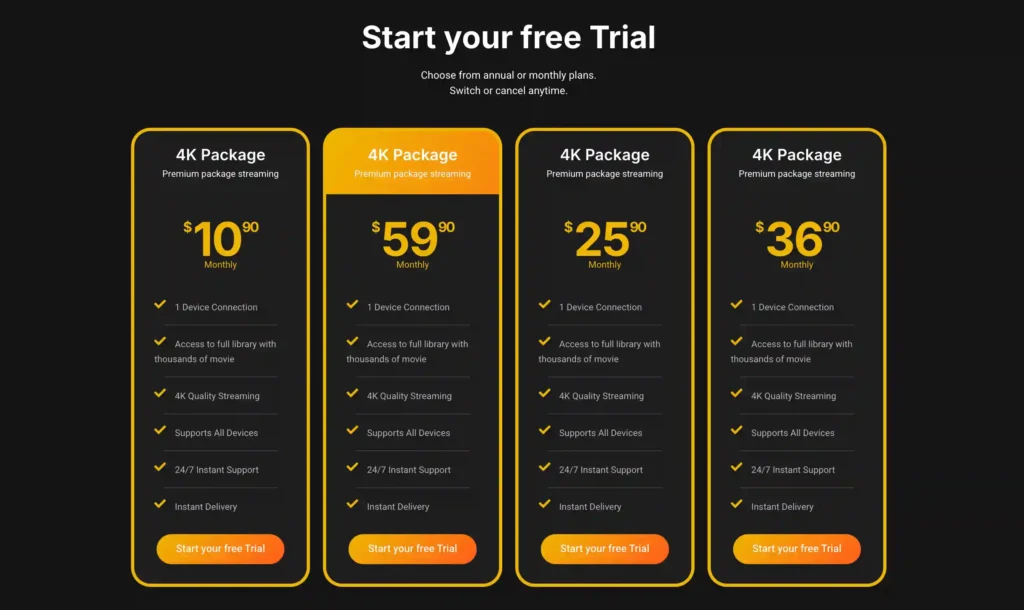
A free trial is available for eligible new users. Subscription prices and promotions can change, so it’s recommended to check the official VibeCasttv
2. Hulu + Live TV: Best for Live TV and On-Demand Streaming
Hulu + Live TV combines a live television package with Hulu’s on-demand library and additional Disney streaming services.
The publicly advertised starting price is $89.99 per month. The plan includes more than 100 live channels, unlimited cloud DVR, Hulu, Disney+, and ESPN content under the applicable package.
Advantages of Hulu + Live TV
- Live television and on-demand entertainment in one subscription
- Unlimited cloud DVR
- Local channels in supported areas
- Disney+ access under eligible plans
- ESPN content under eligible plans
- Support for popular streaming devices
- No traditional cable installation
Limitations of Hulu + Live TV
The standard plan normally supports only two simultaneous live streams. Households needing additional streams may have to purchase an upgrade.
Local channel availability also depends on location.
The package may provide less value to households that already receive Hulu, Disney+, or ESPN through another subscription.
Who Should Choose Hulu + Live TV?
Hulu + Live TV may suit:
- Families using Disney+
- Existing Hulu viewers
- Households wanting live and on-demand content
- Viewers who want local channels and cloud DVR
- People who prefer managing fewer streaming subscriptions
Who Should Avoid Hulu + Live TV?
It may not suit:
- Households requiring many simultaneous streams
- Viewers who do not use the included streaming services
- Consumers looking for a low-cost television package
Check the latest packages on the official Hulu + Live TV page.
3. Sling TV: Best Flexible and Lower-Cost Option
Sling TV offers smaller and more customizable channel packages than many full cable-replacement services.
Its main packages include:
- Sling Orange
- Sling Blue
- Sling Orange & Blue
Sling Orange is publicly listed at approximately $45.99 per month, while the combined Orange & Blue package starts at approximately $60.99 per month.
The exact price and channel availability may vary by location.
Advantages of Sling TV
- Lower starting price than broad live TV packages
- Flexible Orange and Blue plans
- Optional channel add-ons
- Sports, entertainment, and news upgrades
- Monthly cancellation
- Short-duration viewing passes may be available
- Support for popular streaming devices
Limitations of Sling TV
The Orange and Blue packages include different channels, which can make plan selection confusing.
Local channel availability is limited in some areas, and stream limits differ between plans. Certain Sling Orange channels may be restricted to one stream at a time.
Who Should Choose Sling TV?
Sling TV may be suitable for:
- Budget-conscious viewers
- People who know which channels they need
- Sports viewers seeking selected networks
- Households that do not require every local station
- Viewers who prefer customizable add-ons
Who Should Avoid Sling TV?
It may not suit:
- Households wanting a simple all-inclusive package
- Viewers requiring every major local channel
- Families needing several simultaneous streams on Orange channels
Compare the latest options on the official Sling TV plans page.
4. Fubo: Best for Sports-Focused Households
Fubo is a live TV streaming service designed around sports, although it also includes entertainment, local television, news, and lifestyle programming.
Its Pro plan is publicly listed at approximately $88.99 per month after applicable promotional pricing.
The package includes:
- A large live channel lineup
- Unlimited cloud DVR
- Multiple simultaneous streams
- Local channels in supported regions
- National and regional sports networks
- Entertainment and news channels
Advantages of Fubo
- Strong sports-oriented lineup
- Local channels in supported markets
- Unlimited cloud DVR
- Support for several simultaneous streams
- Broad device compatibility
- ZIP-code-based channel information
- Entertainment and news channels included
Limitations of Fubo
Fubo may charge a separate regional sports fee depending on the subscriber’s location and available regional sports networks.
This fee can significantly increase the real monthly price.
A large number of channels also does not guarantee access to a specific team, league, or event. Sports rights and blackout rules can change.
Who Should Choose Fubo?
Fubo may be suitable for:
- Sports-focused households
- Families watching several streams
- Viewers who need selected regional sports networks
- Households wanting sports and general entertainment
- People who use cloud DVR frequently
Who Should Avoid Fubo?
It may not suit:
- Viewers seeking the lowest monthly price
- People who do not regularly watch sports
- Consumers who want a simple price without additional regional fees
Check the latest packages and regional charges on the official Fubo plans page.
5. DIRECTV: Best for a Traditional Television Experience
DIRECTV offers internet-delivered television packages designed to resemble a traditional cable or satellite television experience.
Its Entertainment package is publicly listed at approximately $89.99 per month before temporary promotional discounts.
DIRECTV packages may include:
- Local channels
- National entertainment networks
- News channels
- Sports channels
- Unlimited cloud DVR
- Streaming on compatible devices
- Optional premium networks
Regional sports networks may require a higher-priced package such as Choice or above.
Advantages of DIRECTV
- Traditional television-style experience
- Local channels in supported areas
- Unlimited cloud DVR
- Regional sports options on eligible plans
- Broad device compatibility
- Multiple package levels
- Premium channel add-ons
Limitations of DIRECTV
The temporary promotional price may be lower than the normal recurring price. Readers should verify what the subscription will cost after the promotional period ends.
Regional sports availability depends on the subscriber’s ZIP code and package.
Who Should Choose DIRECTV?
DIRECTV may be suitable for:
- Former cable or satellite subscribers
- Households preferring traditional channel packages
- Regional sports viewers
- People wanting local and national channels
- Families needing cloud DVR
Who Should Avoid DIRECTV?
It may not suit:
- Viewers looking for the lowest-cost option
- People who watch only a few channels
- Consumers who do not want large television packages
Review current options on the official DIRECTV streaming packages page.
6. Philo: Best Affordable Entertainment Service
Philo is one of the least expensive paid live TV streaming services in the United States.
Its Essential plan is publicly listed at $25 per month and includes more than 70 entertainment, reality, lifestyle, and general cable channels.
Philo also provides:
- Unlimited cloud DVR
- Recordings stored for up to one year
- Multiple user profiles
- Up to three simultaneous streams
- Optional premium add-ons
- Applications for popular streaming devices
Advantages of Philo
- Low monthly price
- Entertainment-focused channel lineup
- Unlimited cloud DVR
- Three simultaneous streams
- Multiple user profiles
- No long-term contract
- Optional premium channels
Limitations of Philo
Philo does not carry local ABC, CBS, FOX, or NBC stations.
It also lacks many major sports networks. As a result, Philo is not a complete cable replacement for sports-focused households or viewers who need local news.
Who Should Choose Philo?
Philo may be suitable for:
- Entertainment and reality television viewers
- Budget-conscious households
- People who use an antenna for local stations
- Viewers who do not watch much live sports
- Households wanting unlimited DVR
Who Should Avoid Philo?
It may not suit:
- Sports-focused viewers
- People who need local broadcast stations
- Households wanting an all-in-one cable replacement
Review the current plan on the official Philo Essential page.
Which IPTV Service Is Best for You?
The right service depends on your viewing habits rather than the total number of advertised channels.
| Viewer Type | Recommended Starting Point |
|---|---|
| Broad cable replacement | VibeCastTV |
| Live TV and Disney streaming bundle | Hulu + Live TV |
| Flexible and affordable packages | Sling TV |
| Sports-focused household | Fubo |
| Regional sports and traditional TV experience | DIRECTV |
| Low-cost entertainment channels | Philo |
How to Choose the Right IPTV Service
Make a List of Essential Channels
Write down the channels and programs your household watches regularly.
Separate them into three groups:
- Essential channels
- Preferred channels
- Optional channels
A service offering 200 channels is not valuable if it does not include the five channels you watch most.
Check Availability Using Your ZIP Code
Local television stations and regional sports networks vary by location.
Use the official service website to check:
- Local ABC affiliate
- Local CBS affiliate
- Local FOX affiliate
- Local NBC affiliate
- Regional sports networks
- Local news channels
- Location-based fees
Do not rely only on a national channel list.
Calculate the Real Monthly Cost
The advertised starting price may not be the final amount charged.
Include:
- Base subscription price
- Regional sports fees
- Premium network add-ons
- Extra stream upgrades
- Entertainment packages
- Taxes
- Third-party billing charges
- Price after a free trial
- Price after a promotional period
For example, a service advertised at $88.99 per month may cost more than $100 after a regional sports fee and optional add-ons.
Read the Cancellation Policy
Before subscribing, confirm:
- Whether the plan renews automatically
- Where the subscription must be canceled
- Whether cancellation takes effect immediately
- Whether access continues until the billing period ends
- Whether prepaid periods are refundable
- Whether a trial converts into a paid plan
- Whether third-party billing must be canceled separately
The Federal Trade Commission advises consumers to read automatic-renewal and trial conditions carefully before entering payment information.
Confirm Device Compatibility
Check whether the service supports your exact device and operating-system version.
Common supported devices may include:
- Roku
- Amazon Fire TV
- Apple TV
- Android TV
- Google TV
- Samsung smart TVs
- LG smart TVs
- Vizio smart TVs
- iPhone
- iPad
- Android phones and tablets
- Windows browsers
- Mac browsers
- Gaming consoles
An application may not support every older smart TV model.
How to Evaluate an Unfamiliar IPTV Provider
An unfamiliar provider should not automatically be described as illegal. However, consumers should examine it carefully before paying.
Positive Transparency Signals
Look for:
- A clearly identified company
- Verifiable business contact details
- Published terms and conditions
- A meaningful privacy policy
- Clearly displayed recurring prices
- Automatic-renewal information
- Official applications
- Clear cancellation instructions
- A published refund policy
- Normal card or app-store billing
- Realistic channel and sports claims
- Public information about content partnerships
Warning Signs
Be cautious when a provider offers:
- Thousands of premium channels for a few dollars
- Every major sports event without blackouts
- Lifetime access for a one-time payment
- No identifiable company information
- Only cryptocurrency or person-to-person payments
- Applications from unknown APK websites
- Instructions to disable device security
- Shared usernames and passwords
- Claims that the service cannot be blocked
- Instructions for hiding illegal streaming
- No cancellation process
- No meaningful refund policy
- Fake countdown timers
- Unverifiable customer testimonials
- Guaranteed access to every premium channel
IPTV Player vs. IPTV Subscription
An IPTV player and an IPTV subscription are not the same thing.
An IPTV player is an application used to organize and display authorized television streams, playlists, or electronic program guide information.
An IPTV provider supplies the account, playlist, portal information, or streaming access.
A legitimate player does not automatically make every playlist or provider lawful.
Enter only account information or playlist details supplied by a provider you are authorized to use. VibeCastTV does not provide playlists, server access, portal URLs, usernames, passwords, or television credentials.
Common IPTV Problems and Solutions
Missing Local Channels
Local channel availability depends on the television market and the service’s agreements with local affiliates.
Try the following:
- Confirm your ZIP code in the account.
- Enable location access for the application.
- Check the official local-channel lookup tool.
- Restart the application.
- Contact official customer support if the listed station is missing.
Sports Blackouts
A service may carry a sports network while a specific game remains unavailable because of:
- Local blackout restrictions
- National broadcast rights
- Regional broadcast rights
- Out-of-market packages
- League agreements
- Pay-per-view requirements
A VPN does not make unauthorized streaming legal and may violate a platform’s terms when used to bypass geographic restrictions or sports blackouts.
Buffering and Playback Problems
First determine whether the issue affects:
- One channel
- One application
- One device
- Every streaming service
- Wi-Fi connections only
- The entire internet connection
Recommended checks include:
- Test another channel.
- Test another streaming application.
- Restart the IPTV application.
- Close unused applications.
- Check available device storage.
- Test the connection using Ethernet.
- Move closer to the Wi-Fi router.
- Restart the router when the entire connection is affected.
- Check the provider’s official status page.
- Contact official support if the issue affects only one service.
Too Many Simultaneous Streams
Some services limit how many devices can watch at the same time.
Check:
- The plan’s stream limit
- Whether another household member is watching
- Whether out-of-home viewing has different limits
- Whether an upgrade is required
- Whether an old device session remains active
Unexpected Subscription Charges
Review:
- The confirmation email
- The free-trial expiration date
- Automatic-renewal terms
- Promotional pricing terms
- Your app-store subscriptions
- Your payment-provider statement
Subscriptions purchased through Apple, Google, Roku, Amazon, or another third party may need to be canceled through that platform.
Keep screenshots, confirmation emails, cancellation records, and transaction information if billing continues after cancellation.
Is IPTV Legal in the USA?
IPTV technology is legal in the United States.
The legal concern is whether the provider has authorization to distribute the content and whether the customer is authorized to access it.
Using a legitimate streaming service, official application, or authorized provider is generally lawful.
Activities that may create legal or security risks include:
- Using stolen streaming credentials
- Accessing pirated television feeds
- Sharing unauthorized playlists
- Distributing copyrighted channels without permission
- Using cracked premium applications
- Bypassing subscriptions or paywalls
- Circumventing digital access controls
- Reselling channels without authorization
A legal disclaimer on a provider’s website is not proof that the provider has broadcasting rights.
Do You Need a VPN for IPTV?
A VPN is not normally required to use a legitimate U.S. live TV streaming service from an authorized location.
A VPN may help protect ordinary internet traffic when using public Wi-Fi, but it should not be promoted as a way to:
- Access unauthorized television content
- Avoid paying for a subscription
- Defeat sports blackouts
- Bypass copyright enforcement
- Break geographic restrictions
- Hide illegal streaming activity
A VPN does not make unauthorized streaming legal.
Frequently Asked Questions
What is the best IPTV service in the USA?
YouTube TV is a strong all-around option for households wanting local channels, entertainment, sports, news, and unlimited DVR. The best choice still depends on your ZIP code and required channels.
What is the cheapest legal IPTV-style service?
Among the paid services compared here, Philo has the lowest published price at $25 per month. However, it does not include local broadcast channels or many major sports networks.
Which IPTV service has local channels?
VibeCastTV, Hulu + Live TV, Fubo, and DIRECTV offer local television stations in supported markets. Availability should be confirmed using the service’s ZIP-code lookup tool.
Which IPTV service is best for sports?
Fubo and DIRECTV are useful starting points for sports-focused households. YouTube TV and Hulu + Live TV may provide a more balanced combination of sports, entertainment, and local television.
Always verify the exact league, event, channel, and blackout rules before subscribing.
Is Sling TV cheaper than YouTube TV?
Yes. Sling TV’s entry-level plans cost less than YouTube TV. However, Sling may include fewer local channels and requires more careful comparison between Orange, Blue, and combined packages.
Does Philo include local channels?
No. Philo does not include local ABC, CBS, FOX, or NBC affiliates. Some users combine Philo with a television antenna for local over-the-air stations.
Can an IPTV provider guarantee every U.S. channel?
Consumers should be cautious about such a guarantee. Channel contracts, local affiliates, sports rights, blackout restrictions, and geographic availability change regularly.
Transparent services normally explain these limitations rather than promising every channel in every location.
Final Verdict
There is no single IPTV service that is best for every U.S. household.
- Choose VibeCastTV for a broad cable-replacement experience.
- Choose Hulu + Live TV when you want live channels and a large streaming bundle.
- Choose Sling TV for flexible and comparatively affordable packages.
- Choose Fubo for a sports-focused channel lineup.
- Choose DIRECTV for a traditional television experience and regional sports options.
- Choose Philo for affordable entertainment channels.
Before paying for any service:
- Confirm the regular monthly price.
- Check the channel lineup for your ZIP code.
- Review regional sports fees.
- Read the automatic-renewal terms.
- Confirm device compatibility.
- Check the cancellation process.
- Investigate who owns and operates the service.
- Avoid providers making unrealistic premium-channel claims.
Independent Research Disclosure
This article was prepared using official service websites, published pricing and policy information, government consumer guidance, and independent editorial analysis.
Testing Disclosure
VibeCastTV did not provide hands-on testing records for the services discussed in this article. No claims are made about loading speed, buffering frequency, application performance, uptime, picture quality, or customer-support response times.
Affiliate Disclosure
VibeCastTV may earn a commission from qualifying purchases made through certain links. This does not increase the price paid by the reader. Commercial relationships do not replace the evaluation criteria explained in this article.
Copyright and Lawful-Use Notice
This article is intended for general education and lawful troubleshooting. VibeCastTV does not sell IPTV subscriptions, host television channels, provide streaming credentials, distribute playlists, or encourage copyright infringement.
Readers should use only services and content they are authorized to access. Provider licensing, platform availability, and streaming rights vary by country and may change over time.







